On this page ▾
- What Is WhatsApp Automation?
- How Does WhatsApp Automation Work?
- What Can Businesses Automate on WhatsApp?
- Benefits of WhatsApp Automation for Businesses
- WhatsApp Business App vs WhatsApp Business API
- WhatsApp Automation vs WhatsApp Chatbot vs AI Agent
- What You Must Know Before You Automate
- WhatsApp Automation for Different Industries
- WhatsApp Automation for Small Businesses
- What Features Should You Look for in WhatsApp Automation Software?
- How to Choose a WhatsApp Automation Platform
- How Bigool Connect Helps Businesses Automate WhatsApp Communication
- How to Get Started
- Frequently Asked Questions
- More Guides for Odisha Businesses
Most customers already use WhatsApp every day. They expect a business to reply there, confirm things there, and remind them there. The trouble is that doing all of this by hand does not hold up once you have more than a few dozen customers.
WhatsApp automation is the answer: software that sends and manages WhatsApp messages for you, based on rules, schedules and customer actions. This guide explains what it is, how it works, what you can safely automate, how the WhatsApp Business App differs from the Business API, and how to choose a platform. It is written for business owners, not engineers.
What Is WhatsApp Automation?
WhatsApp automation is using software to send, route and answer WhatsApp messages automatically, based on triggers such as a customer action, a date, or an incoming message. A human steps in where judgement is needed.
It is made of a few simple parts:
- Automated messages: a message that goes out without someone typing it, such as an order confirmation or a welcome note.
- Triggers: the event that starts it, such as a new enquiry, a booking, a birthday, or an unpaid invoice date.
- Workflows: a trigger plus the steps that follow, for example "send a reminder, wait two days, follow up if no reply."
- Templates: pre-approved message formats. WhatsApp requires approved templates for most business-initiated messages sent outside an active customer conversation.
- Customer conversations: the shared inbox where replies land, so your team can answer.
- Campaigns: one message sent to many selected contacts, such as an offer or event invitation.
- Notifications: transactional updates, such as "your order is ready."
- Customer data (CRM): names, tags, notes and history, so messages can be personal and targeted.
- AI assistance: an AI that can draft or send replies to routine questions, ideally with a path to a human.
A simple example: a coaching centre collects an enquiry. The system saves the contact, sends a welcome message with course details, reminds the counsellor to call, and sends a follow-up three days later if the parent has not replied. Nobody typed those messages.
How Does WhatsApp Automation Work?
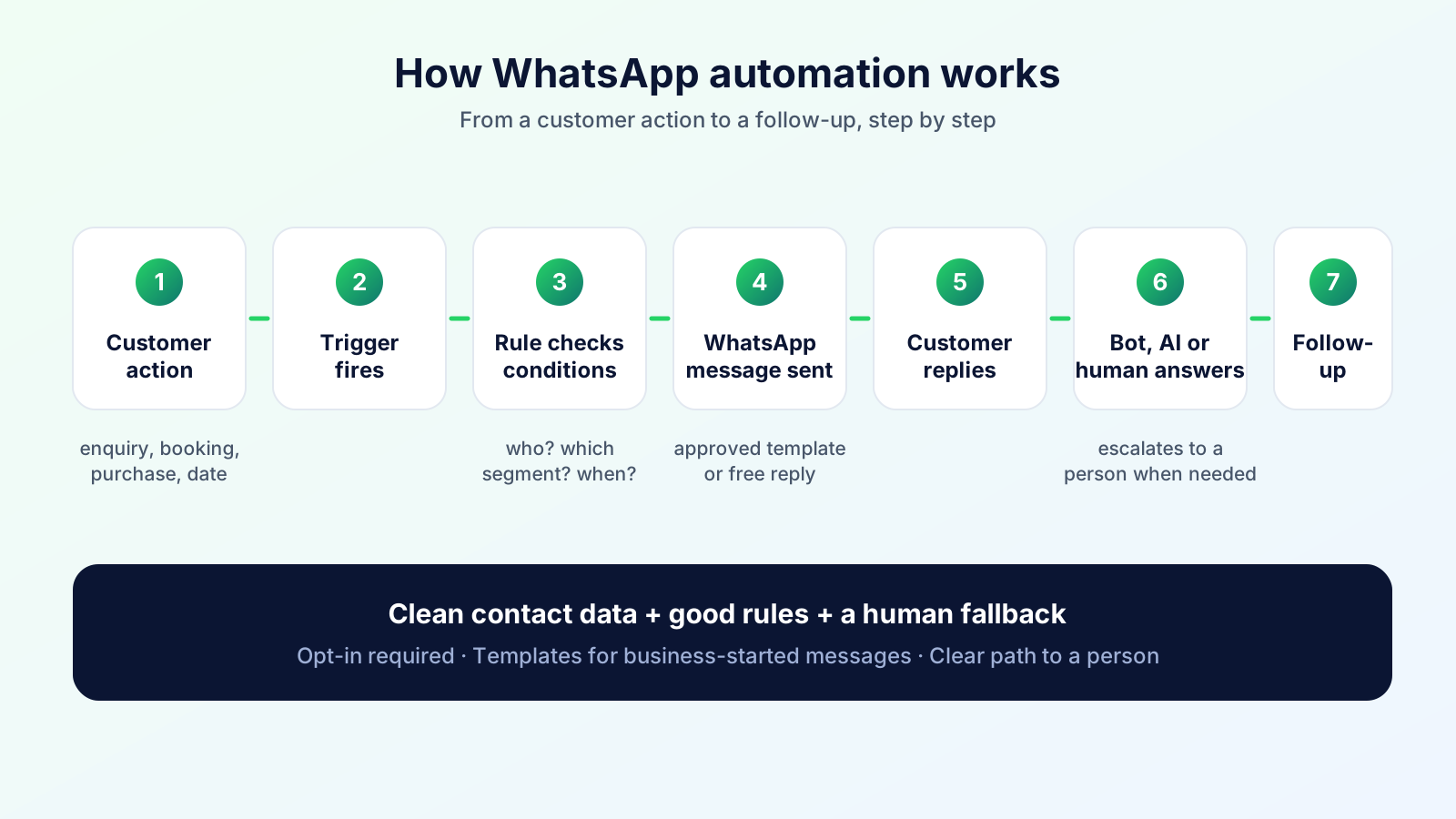
In short: something happens, a rule recognises it, the system sends the right WhatsApp message, and the conversation is handed to the right person or bot when the customer replies.
Customer action (enquiry, booking, purchase, date)
        ↓
Trigger fires
        ↓
Automation rule checks conditions (who? which segment? what time?)
        ↓
WhatsApp message or template is sent
        ↓
Customer replies
        ↓
Handled by: automated reply / AI agent / human team member
        ↓
Follow-up (reminder, feedback request, next step)
Three practical points make this work well:
- Clean contact data. Automation can only be as personal as the data behind it: name, tags, last interaction, dates.
- Good rules. "Send a reminder 24 hours before the appointment" is a rule. "Message everyone" is not.
- A human fallback. Replies will always arrive that no rule anticipated. Someone must see them.
What Can Businesses Automate on WhatsApp?
Not everything is available in every setup. Some items depend on using the WhatsApp Business Platform (API) through a provider, on approved templates, on your business rules, or on platform configuration. Treat this list as what is possible, then confirm each with your provider.
| What you can automate | Example | Usually needs |
|---|---|---|
| Welcome messages | Greeting a new enquiry with next steps | Reply inside the customer window, or a template |
| Customer enquiries / FAQs | Hours, fees, directions, menus | Rules or chatbot/AI |
| Lead follow-ups | A reminder two days after an unanswered enquiry | Template + scheduling |
| Appointment reminders | "Your visit is tomorrow at 4 pm" | Template (utility) |
| Order and status updates | Confirmed, ready, dispatched | Template + data source |
| Payment reminders | Fee or invoice due notices | Template; follow local rules |
| Feedback requests | Ask for a rating after a visit | Template |
| Customer support | Routing, tagging, answering common questions | Inbox + rules/AI |
| Promotional campaigns and offers | Festival offer to opted-in customers | Marketing template + opt-in |
| Event notifications | Open day, workshop or sale invitations | Template + opt-in |
| Admission communication | Documents needed, deadlines, counselling slots | Template + contact data |
| Renewal reminders | Membership or service renewal | Template + date data |
| Birthday / occasion messages | A greeting on the customer's date | Date field + template |
| Re-engagement | A note to customers who went quiet | Segment + marketing template |
Be careful with "promotional" messages. They are the category most likely to generate blocks and reports, and WhatsApp can limit what a business may send when users complain.
Benefits of WhatsApp Automation for Businesses
These are practical benefits, not guarantees. Results depend on your audience, offer and message quality.
- Saves staff time. Reminders, confirmations and standard answers stop being typed one by one.
- Faster first response. An instant acknowledgement means a customer is not left wondering.
- Better follow-up. Rules do not forget the lead you spoke to last Tuesday.
- Manages large lists. Tags and segments let you reach the right 300 people instead of everyone.
- More consistent messaging. Approved templates keep tone, details and spelling the same.
- Supports engagement. Timely, relevant messages keep customers connected between purchases.
- Scales communication. Growth does not require a proportional increase in staff on the phone.
- Structured workflows. Teams see who said what, what was sent, and what is pending.
WhatsApp Business App vs WhatsApp Business API
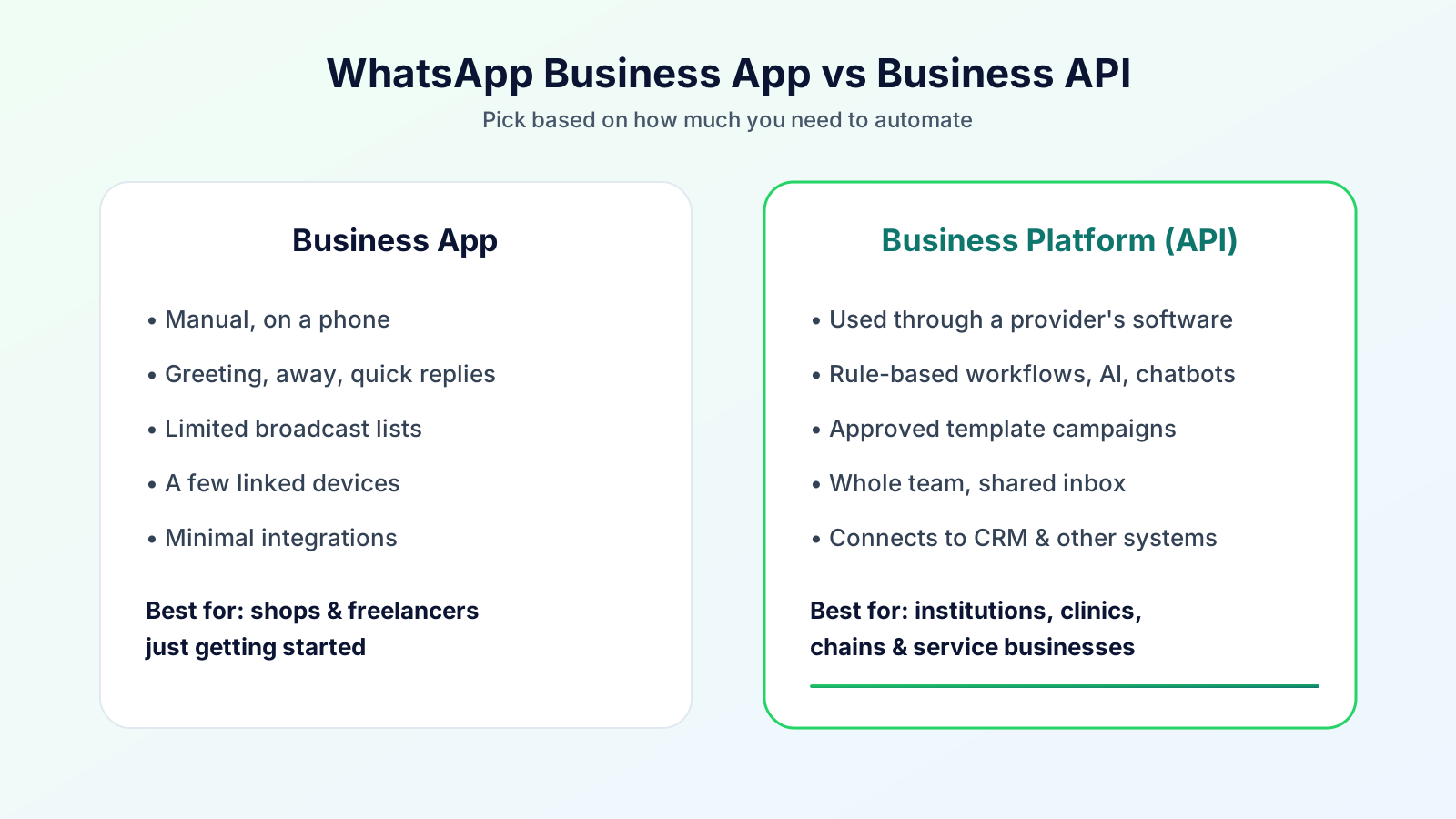
WhatsApp offers two business products. The WhatsApp Business App is an app for small businesses to chat with customers. The WhatsApp Business Platform (often called the API) is built for larger or more automated communication and is accessed through Meta or an approved provider.
| WhatsApp Business App | WhatsApp Business Platform (API) | |
|---|---|---|
| Intended users | Individual owners, very small teams | Growing businesses, institutions, multi-team operations |
| Automation | Basic: greeting, away message, quick replies | Rule-based workflows, chatbots, AI, system triggers (via a provider) |
| Scale | Manual, limited | Built for high volume |
| Templates | Not the same template system | Approved message templates for business-initiated messages |
| Campaigns | Limited broadcast lists; recipients generally must have saved your number | Template campaigns to opted-in contacts, subject to Meta's limits |
| Multiple users | Limited number of linked devices | Multi-agent access through the provider's software |
| Integrations | Minimal | Integration with CRMs and other systems, depending on the provider |
| CRM connectivity | Labels only | Contact data, tags, history in a connected system |
| Business workflows | Manual | Automated and measurable |
| AI integration | Not designed for it | Possible through the provider |
| Suitable for | Shops and freelancers getting started | Colleges, clinics, chains, service firms, anyone needing automation at scale |
Important: the API is not a free-for-all. The platform has rules: Meta's Business Messaging Policy, template approval, and limits that depend on quality. A number used on the Platform is generally separate from one used in the consumer/Business App, so plan your migration before switching. Check Meta's documentation for current details, or read our full guide to the WhatsApp Business API.
WhatsApp Automation vs WhatsApp Chatbot vs AI Agent
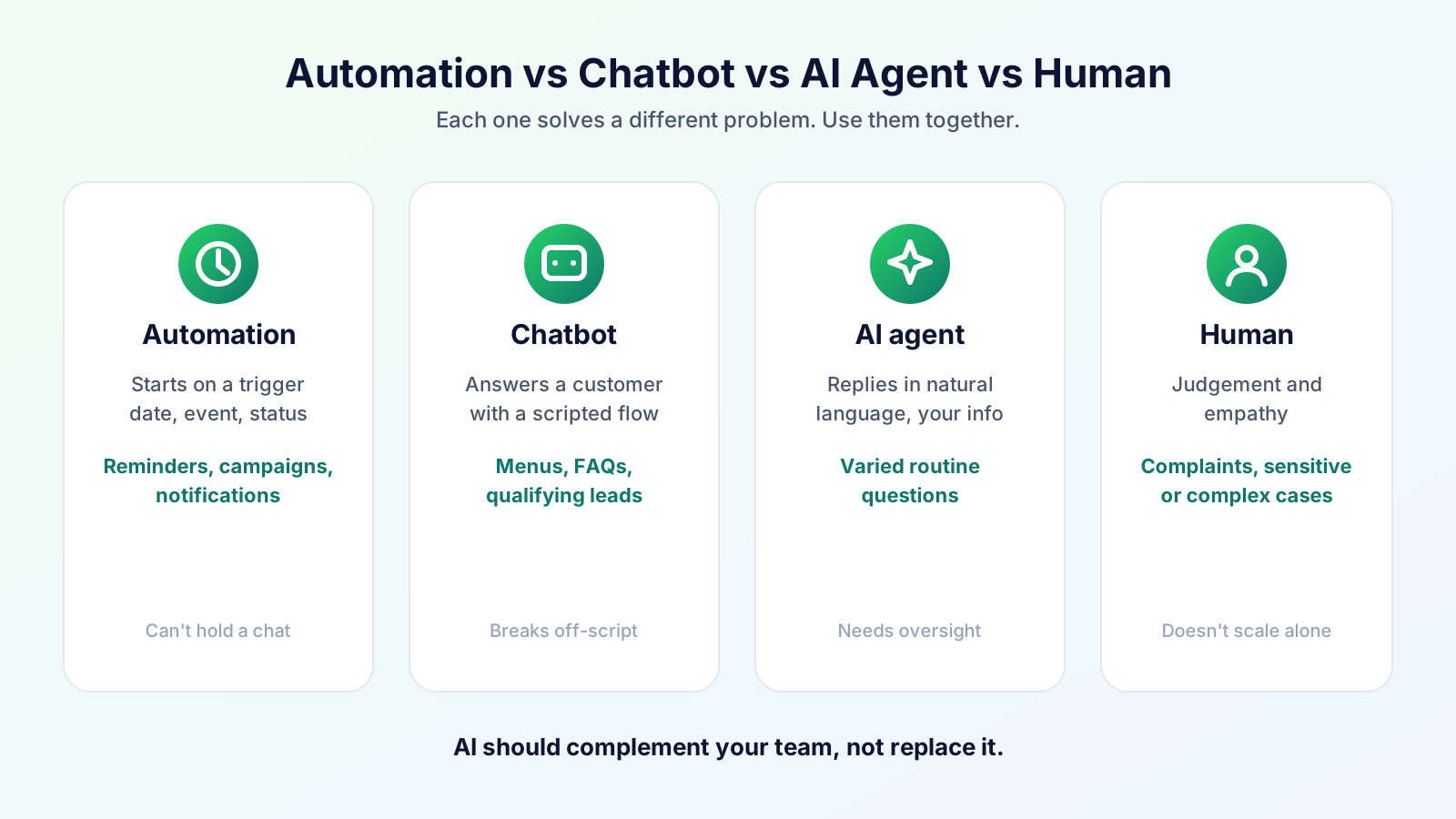
These terms get mixed up. They solve different problems.
| WhatsApp automation | Chatbot | AI agent | Human support | |
|---|---|---|---|---|
| What it is | Rule-driven sending and routing | Scripted or intent-based conversation flow | An AI model answering in natural language, optionally taking small actions | Your team |
| Starts when | A trigger fires (date, event, status) | A customer messages | A customer messages | A customer or the system escalates |
| Best for | Reminders, campaigns, notifications | Menus, FAQs, qualifying leads | Varied questions in your business's own words | Complaints, negotiation, sensitive or complex cases |
| Weakness | Cannot handle open conversations | Breaks when questions go off-script | Needs good business information and oversight | Does not scale to every routine question |
For a deeper look at how chatbots and AI agents work and what WhatsApp allows, read our complete guide to WhatsApp chatbots and AI agents.
The practical rule: use automation for things you already know will happen, chatbots for predictable questions, an AI agent for the long tail of routine questions, and humans for everything that matters. An AI agent should complement your team, not replace it. Meta's policy expects clear paths to a human during the customer service window, so build handoff in from day one.
What You Must Know Before You Automate
Meta publishes the rules; here is the short version of what matters most. Always check the WhatsApp Business Messaging Policy for current terms.
- Opt-in is required. You may message people only if they gave you their number and you have their permission to contact them on WhatsApp. Meta's guidance is that you state clearly that the person is opting in and which business they are opting in to. Use separate consent for different message types where practical.
- Templates for business-initiated messages. Messages sent outside an active customer conversation generally use templates approved by Meta.
- The 24-hour customer service window. When a customer messages you, you can reply freely within that window.
- Quality matters. Users can block or report businesses. Meta may limit how many messages a business can send based on that feedback.
- Escalation paths. Automated experiences should offer a way to reach a human.
- Local laws. Data protection, consumer and telecom rules in your country also apply. This is not legal advice; ask your adviser if unsure.
WhatsApp Automation for Different Industries
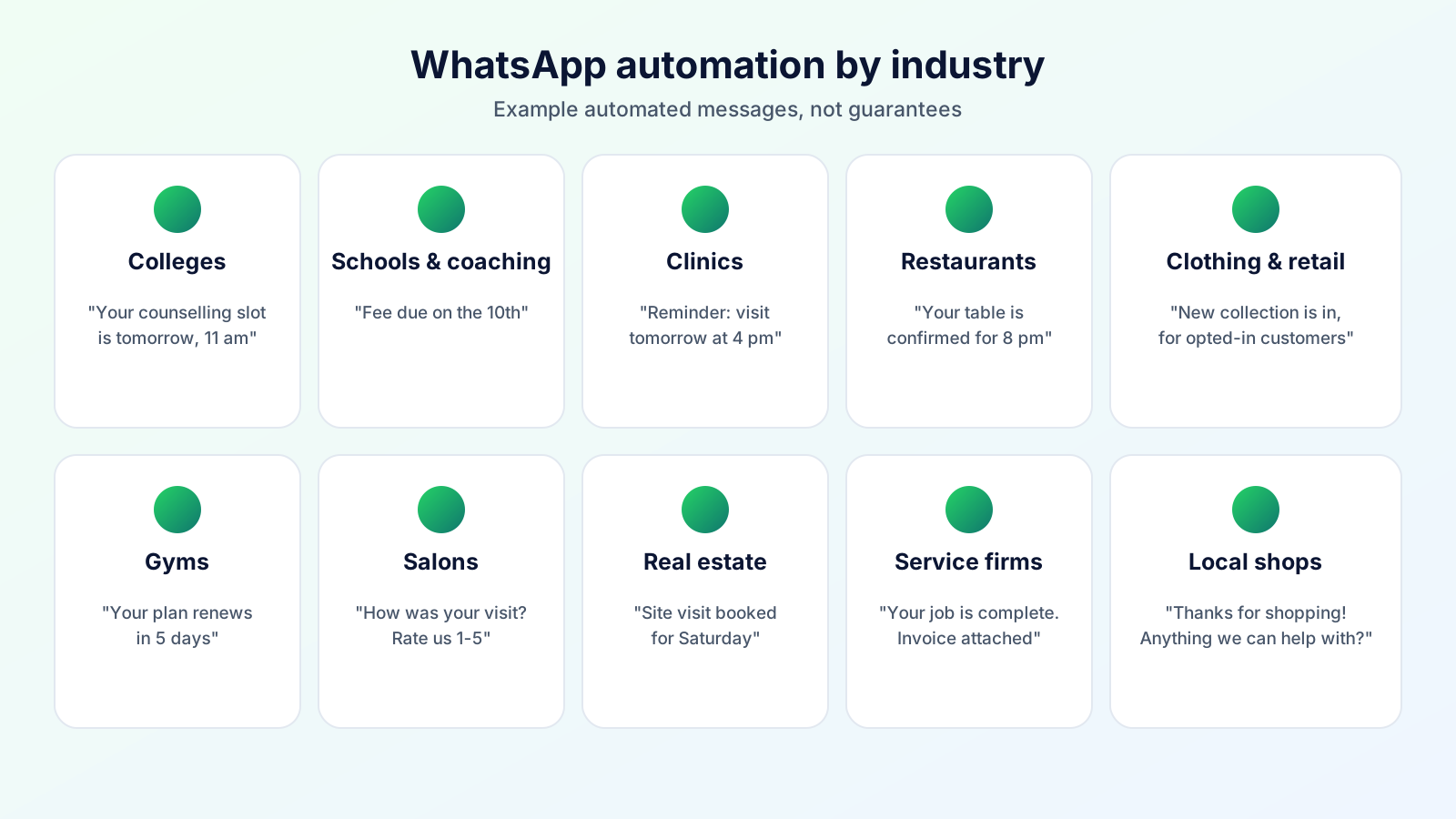
These are realistic patterns, not case studies or promises.
1. Colleges and universities Problem: thousands of enquiries during admission season, repeated questions about fees, dates and documents. Automation: an instant reply with the prospectus and deadlines; tags by course interest; reminders for counselling slots and document submission; event invitations to opted-in applicants. Benefit: counsellors spend time on the applicants who need a conversation.
2. Schools and coaching institutes Problem: fee reminders, class changes and exam notices must reach hundreds of parents. Automation: template notices by batch or class; fee-due reminders; absence or result notifications to opted-in parents. Benefit: consistent, trackable communication without calling each family.
3. Hospitals and clinics Problem: missed appointments and repeated "what time/where" calls. Automation: appointment confirmation and reminders, follow-up visit prompts, health-camp invitations. Keep clinical advice with clinicians. Benefit: fewer no-shows and a calmer front desk.
4. Restaurants Problem: regulars forget you; reservations and order queries fill the phone. Automation: booking confirmations, order-status updates, opted-in festival offers, birthday greetings. Benefit: repeat visits prompted without staff time.
5. Clothing and retail stores Problem: new arrivals and sales reach only people who happen to check. Automation: segmented offer campaigns, back-in-stock or new-collection notes to opted-in customers, a follow-up after purchase. Benefit: relevant messages to the right customers, not blanket broadcasts.
6. Gyms and fitness centres Problem: membership renewals lapse quietly and trial leads go cold. Automation: trial follow-ups, renewal reminders before expiry, win-back messages for lapsed members, birthday wishes. Benefit: fewer forgotten renewals and steadier follow-up.
7. Salons and makeover studios Problem: last-minute cancellations and idle slots. Automation: appointment reminders, post-visit feedback requests, occasion-based offers for bridal/event seasons. Benefit: a fuller calendar and customers who feel remembered.
8. Real estate businesses Problem: enquiries from many sources, slow follow-up, site visits that fall through. Automation: instant property-detail reply, site-visit reminders, staged follow-ups, tags for budget/location interest. Benefit: no lead waits days for a first message.
9. Service businesses Problem: quotes, bookings and payment follow-ups scatter across chats. Automation: booking confirmations, job status updates, payment reminders, review requests. Benefit: clear status for customers and fewer "any update?" messages.
10. Local small businesses Problem: one owner doing sales, service and chasing payments. Automation: greeting and FAQ replies, simple reminders, a few well-timed offers to loyal customers. Benefit: professional, consistent communication without a dedicated support team.
WhatsApp Automation for Small Businesses
You do not need a technical team. Most of the value comes from a handful of repeatable messages: a welcome reply, an appointment or payment reminder, a thank-you with a feedback request, and an occasional offer to people who agreed to hear from you.
Shops, local service providers, restaurants, gyms, salons, coaching centres and small institutions all have the same shape of problem: many small, repeated conversations. Start with one or two workflows, check how customers respond, then add more. If you currently run on the WhatsApp Business App and only handle a few chats a day, that may be enough. When you need reminders, campaigns and multiple staff members, a platform becomes worth it.
What Features Should You Look for in WhatsApp Automation Software?
| Feature | Why it matters |
|---|---|
| Contact management | Names, tags, notes and history make messages relevant |
| Campaign management | Send to a selected audience, track delivery, retry or exclude contacts |
| Message templates | Create, submit and reuse templates without leaving the tool |
| Automation workflows | Date, event and status triggers for reminders and follow-ups |
| Shared inbox | Everyone sees the same conversations |
| Multiple users and roles | Staff access with appropriate permissions |
| Multiple businesses/accounts | Useful for owners or agencies with more than one brand |
| Segmentation | Target by tag, status or interest |
| Scheduling | Send at the right time, not just now |
| Analytics and delivery status | See what was delivered, read or failed |
| Chatbot and AI agent | Handle routine questions, with human handoff |
| CRM/API integration | Connect to billing, bookings or your own systems (check what is supported) |
| Logs and history | Know what was sent and when |
| Opt-in and compliance controls | Keep a record of consent and honour opt-outs |
How to Choose a WhatsApp Automation Platform
Use this checklist when comparing tools:
- Official integration. Does it use Meta's WhatsApp Business Platform, not an unofficial workaround that risks your number?
- Reliability. Does it handle delivery issues and show clear status?
- Security. Where is data stored, who can access it, and how are team permissions handled?
- Scalability. Will it cope with your next 10× contacts?
- Ease of use. Can your non-technical staff run it after a short walkthrough?
- Automation flexibility. Can it model your processes (renewals, admissions, appointments)?
- Plans. Is it clear what each plan includes? Ours are on the pricing page.
- Support. Is someone reachable when a campaign or number has an issue?
- Analytics. Can you see delivery and response?
- Template management. Can you create and track approvals in one place?
- AI capabilities. Is AI optional, controllable and able to hand off to a person?
- Integrations. Does it connect to what you already use, or at least to your data?
- Compliance. Does it support opt-in records and respect Meta's policy?
Beware of tools promising "unlimited messaging to anyone." Unofficial tools that automate personal WhatsApp accounts can lead to number bans.
How Bigool Connect Helps Businesses Automate WhatsApp Communication
Bigool Connect, built by Bigool Digital, is a WhatsApp business communication platform that brings the pieces above into one workspace.
- Contacts and CRM basics: manage contacts with tags and notes so your messages are targeted.
- WhatsApp campaigns: send campaigns to selected audiences, exclude specific contacts, and send again to contacts whose messages failed, were delivered or were read.
- Automation: set up automated communication such as date-based messages (for example birthdays) and reminders for businesses like gyms and institutions.
- Templates: work with WhatsApp message templates suited to your business.
- Shared inbox: manage customer conversations with your team, with notifications for new messages.
- AI-assisted replies: optionally let an AI answer routine questions using your business information. It can flag a chat for a human and pause itself, and AI can be switched off per chat. It is meant to support your team, not replace it.
- Multiple businesses: manage more than one business from one account where your plan allows.
Bigool Connect works with Meta's WhatsApp Business Platform, so the opt-in and template rules above still apply. Feature availability depends on your plan and setup; see the pricing page for plans and charges.
Explore Bigool Connect and see how WhatsApp automation can fit your business communication workflow. → Book a demo or explore the platform
How to Get Started
- Pick one problem. Late renewals, missed appointments, slow lead replies.
- Collect opt-in properly and record how each person agreed.
- Prepare your contact list with names and useful tags.
- Choose a platform using the checklist above and complete Meta business setup.
- Create and submit a few templates: confirmation, reminder, follow-up.
- Launch one workflow and review delivery, replies and complaints for a couple of weeks.
- Add human handoff, then expand to more workflows.
Frequently Asked Questions
What is WhatsApp automation? It is the use of software to send and manage WhatsApp messages automatically, based on triggers such as a date, a customer action or an incoming message, with humans handling what needs judgement.
How does WhatsApp automation work? A trigger (such as a new enquiry or an upcoming appointment) fires a rule. The rule sends a WhatsApp message or template. Replies go to a chatbot, an AI agent or your team, and a follow-up can be scheduled.
Is WhatsApp automation legal? Automation itself is allowed on the WhatsApp Business Platform when you follow Meta's Business Messaging Policy, get opt-in from recipients, and comply with local laws. Using unofficial tools to automate personal accounts can breach WhatsApp's terms and risk bans. This is general information, not legal advice.
What is the WhatsApp Business API? It is the WhatsApp Business Platform interface that lets businesses connect WhatsApp to software (through Meta or an approved provider) for templates, campaigns, shared inboxes and automation at scale.
What is the difference between the WhatsApp Business App and the API? The app is a manual tool for small teams with basic automation like greetings and quick replies. The API is built for automation, multiple users, templates and integrations, with more rules for business-initiated messages.
Can small businesses use WhatsApp automation? Yes. Small businesses often benefit most from a few simple workflows such as reminders, follow-ups and feedback requests. Start small and expand.
Can WhatsApp messages be automated? Yes, through the Business App's basic features or, for fuller automation, through the WhatsApp Business Platform with a provider.
Can WhatsApp automation send promotional messages? Yes, but only to people who opted in, and typically using approved marketing templates. Promotional messages are the most likely to draw blocks, so keep them relevant and infrequent.
What is a WhatsApp chatbot? A program that conducts a scripted or intent-based conversation with customers on WhatsApp, such as a menu or FAQ flow.
What is a WhatsApp AI agent? An AI-powered assistant that answers in natural language using your business's information and can take small actions, ideally with a path to a human teammate.
How much does WhatsApp automation cost? For current plans and how WhatsApp usage is charged, see https://bigoolconnect.in/pricing
How do I choose WhatsApp automation software? Check that it uses the official platform, supports templates, campaigns, inbox and workflows, offers human handoff and opt-in controls, is secure, and fits your needs, then run a small pilot.
Talk to Bigool Digital about WhatsApp automation for your business → bigoolconnect.in
Sources: WhatsApp Business Messaging Policy, Meta developer docs: opt-in. Bigool Connect is an independent product and is not endorsed by or affiliated with WhatsApp or Meta.
More Guides for Odisha Businesses
- Language: Odia WhatsApp message templates
- Choosing: WhatsApp Business App vs API
- Cities: Rourkela, Berhampur, Puri, Balasore and Bhadrak, Jharsuguda and Angul, Koraput, Jeypore and Baripada
- Industries: coaching institutes, clinics, food businesses, jewellers and handloom shops, hotels and homestays, real estate, gyms and salons
- Seasons: Rath Yatra, Durga Puja and Diwali, Odia festival greetings
- Getting started: WhatsApp for Odisha MSMEs