On this page ▾
- What Is the WhatsApp Business API?
- How Does the WhatsApp Business API Work?
- What You Need to Get Started
- WhatsApp Business App vs WhatsApp Business API
- What Can You Do With the WhatsApp Business API?
- What Does the WhatsApp Business API Cost?
- Messaging Limits and Quality
- How Do Message Templates Work?
- Opt-In and Compliance
- Official Business Account (the Blue Tick)
- Do You Need the API, or Is the Business App Enough?
- How to Get the WhatsApp Business API
- How Bigool Connect Works With the WhatsApp Business API
- Frequently Asked Questions
- More Guides for Odisha Businesses
If you have searched for ways to send WhatsApp messages to many customers, you have probably met the term WhatsApp Business API. It sounds technical, but the idea is simple: it is the official way for a business to connect WhatsApp to software, so a whole team can manage conversations, send approved messages and automate routine work.
This guide explains what the WhatsApp Business API is, how it works, what you need to get access, and where its limits are. It is written for business owners. No coding knowledge is needed. If you are new to the topic, our complete guide to WhatsApp automation covers the bigger picture first.
What Is the WhatsApp Business API?
The WhatsApp Business API is the interface of the WhatsApp Business Platform that lets businesses connect WhatsApp to software, so they can send template messages, run campaigns, share an inbox across a team and automate replies at scale.
Meta, the company behind WhatsApp, now calls the whole offering the WhatsApp Business Platform. "API" is the everyday name. The version Meta hosts itself is the Cloud API, which means you do not run any servers of your own.
The most important thing to understand is that the API is not an app. There is no screen to open on your phone. You use it through software, such as a WhatsApp automation platform, that connects to Meta for you and gives you an inbox, contact list, template manager and campaign tools.
How Does the WhatsApp Business API Work?
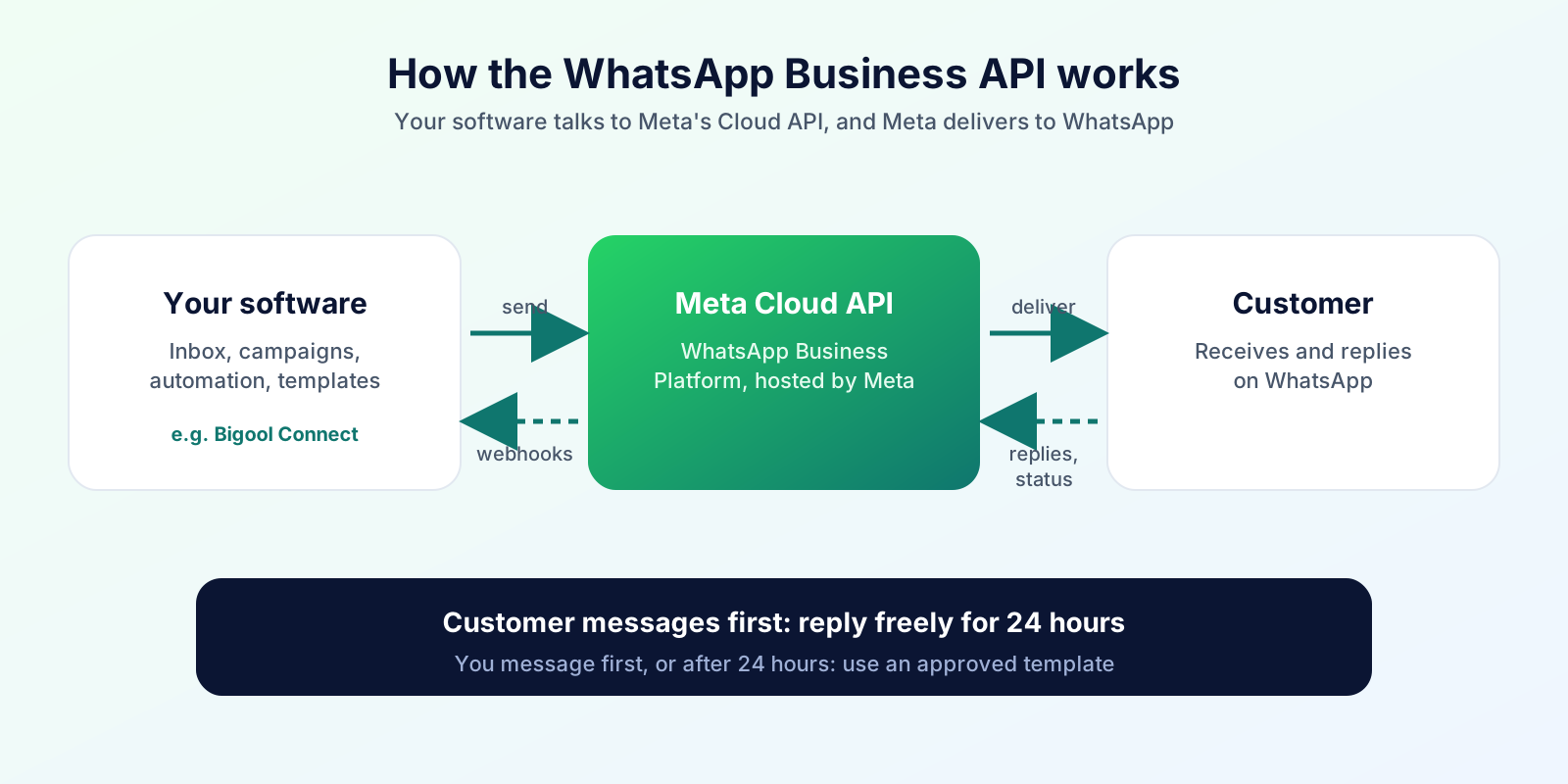
In short: your software sends a message request to Meta's Cloud API, Meta delivers it to the customer on WhatsApp, and customer replies and delivery updates come back to your software.
Your software (inbox, campaigns, automation)
        ↓  sends a message request
Meta's WhatsApp Business Platform (Cloud API)
        ↓  delivers to the customer
Customer's WhatsApp
        ↓  reply, read receipt, delivery status
Back to your software → your team, a bot or an AI agent answers
Three ideas explain most of how it behaves:
- Business-started vs customer-started conversations. When a customer messages you first, you can reply freely for the next 24 hours. This is called the customer service window. When you want to start a conversation, or write after the window closes, you must use an approved message template.
- Templates. A template is a pre-written message, with placeholders for names, dates or amounts, that Meta reviews and approves. Reviews usually complete automatically and can take up to 24 hours.
- Webhooks. Meta notifies your software in real time when a message arrives or a delivery status changes. This is how an inbox shows new chats instantly.
What You Need to Get Started
According to Meta's documentation, the building blocks are:
- A Meta business portfolio. The container that holds your WhatsApp assets. It can be verified, which unlocks better limits and features.
- A WhatsApp Business Account (WABA). Represents your business and holds your phone numbers, templates and analytics.
- A business phone number. A real or virtual number that can receive a verification call or code.
- A display name. The business name customers see. It must follow Meta's naming rules.
- A payment method. Needed to send billable template messages.
- A provider or your own developer. Most small and mid-sized businesses use a platform that handles the technical connection.
About your existing number. A phone number is normally used either in the WhatsApp Business App or on the API, so moving a number can mean moving your chat history to the new setup. Meta also offers options for using the app and the API together. Read Meta's current guidance before you switch a number that your team uses daily.
WhatsApp Business App vs WhatsApp Business API
| WhatsApp Business App | WhatsApp Business API | |
|---|---|---|
| Who uses it | Individual owners, very small teams | Growing businesses and institutions |
| How you use it | A phone app | Through software that connects to Meta |
| Automation | Greeting, away message, quick replies | Workflows, chatbots, AI, scheduled messages |
| Team access | Limited linked devices | Many agents in a shared inbox |
| Campaigns | Small broadcast lists | Approved template campaigns |
| Integrations | Minimal | CRM and other systems, via the provider |
For a fuller side-by-side, see the comparison in our WhatsApp automation guide.
What Can You Do With the WhatsApp Business API?
- Send approved notifications: appointment reminders, order updates, payment and renewal reminders.
- Run campaigns to customers who opted in.
- Work as a team in a shared inbox, with several people answering from one business number.
- Automate repeated work such as follow-ups, date-based messages and replies to common questions.
- Use interactive messages, such as reply buttons and lists, where your provider supports them.
- Add AI assistance to answer routine questions, ideally with a way to hand over to a person.
- Connect to other systems so customer data and messages stay in sync, depending on what your provider offers.
What Does the WhatsApp Business API Cost?
For current plans and how WhatsApp usage is charged, see our pricing page.
Messaging Limits and Quality
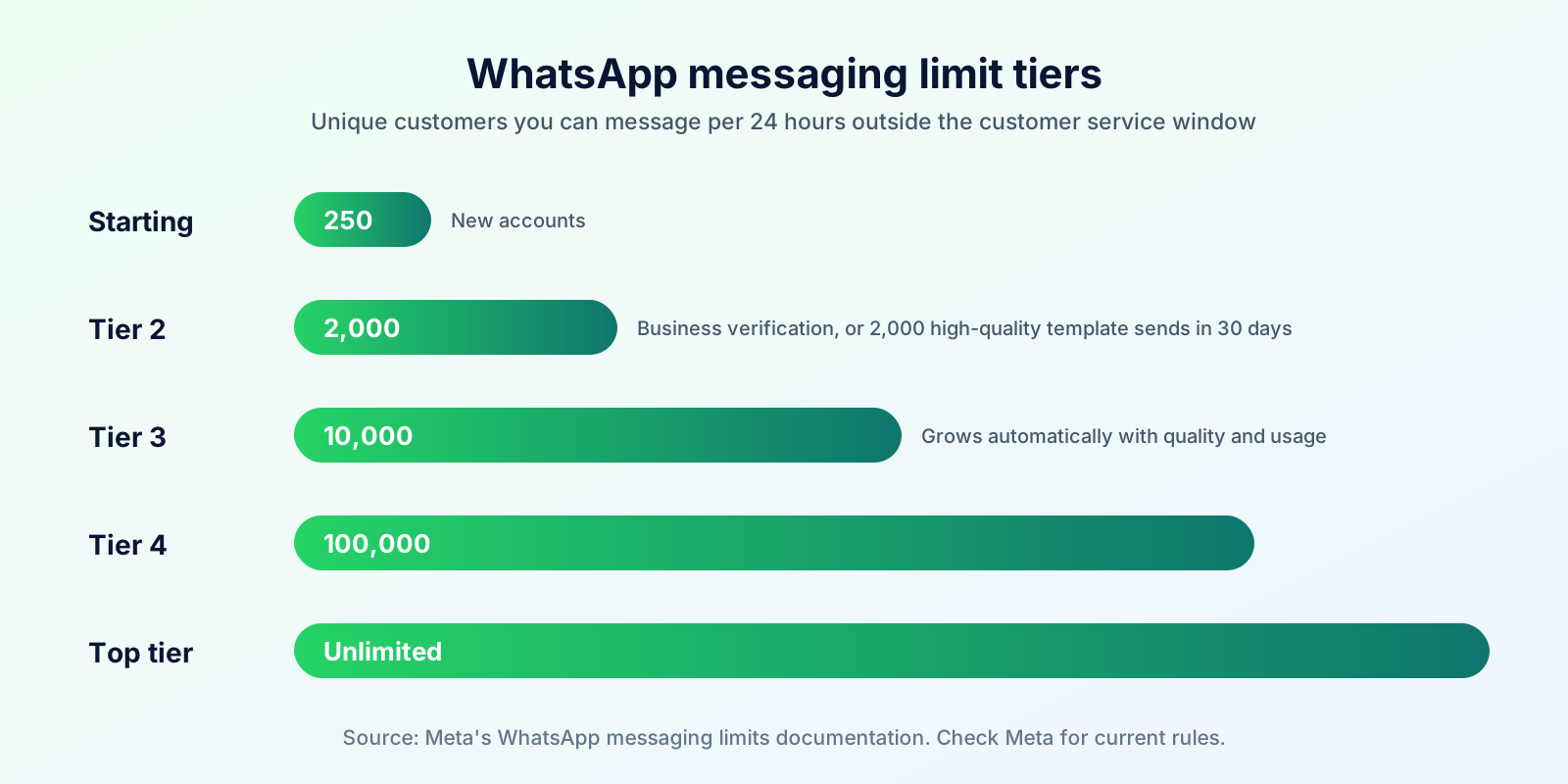
New accounts do not get unlimited sending. Meta limits how many unique customers you can message outside a customer service window in a rolling 24 hours:
| Tier | Unique customers per 24 hours |
|---|---|
| Starting limit | 250 |
| Next | 2,000 |
| Then | 10,000 |
| Then | 100,000 |
| Top | Unlimited |
Business verification is one route to the 2,000 tier. Another is to send 2,000 delivered template messages to unique customers within 30 days with high quality ratings. After that, limits usually grow automatically if your messages are high quality and you use a good share of your current limit.
Quality matters. Customers can block or report businesses. Poor quality can pause templates or reduce your limits. The practical lessons are to message only people who opted in, keep messages relevant, and avoid sending too often.
How Do Message Templates Work?
- Three categories: marketing, utility and authentication. Choose honestly, because Meta checks that the category matches the content. Meta can reclassify templates it considers mislabelled.
- Review: submitted templates are reviewed, usually within 24 hours. Only approved templates can be sent.
- Statuses and quality: templates can be in review, approved, paused, rejected or disabled, and active ones carry a quality rating based on customer feedback and engagement.
- Housekeeping: templates unused for a long period can be archived automatically.
For wording examples and rejection fixes, see our guide to WhatsApp message templates.
Tips for approval: write clear text that tells the customer why they are getting the message, use variables for personal details, keep promotional wording out of utility templates, and never ask for sensitive information such as passwords or card numbers.
Opt-In and Compliance
Meta's Business Messaging Policy says you may only contact people who have given you their number and opted in to hear from you on WhatsApp. Meta's guidance is that you clearly say a person is opting in and which business they are opting in to. Opt-in can be collected through a website form, in person, on paper, by SMS or other channels, as long as you follow applicable law.
Automation should also give customers a clear way to reach a human. Keep records of how and when each person agreed, and stop messaging anyone who asks you to.
Official Business Account (the Blue Tick)
Businesses on the API can apply for an Official Business Account, shown with a blue check. Meta's requirements include verified business status, an approved display name, two-step verification, policy compliance and a minimum period on the platform. The badge is a trust signal, not a requirement for sending messages.
Do You Need the API, or Is the Business App Enough?
The app is probably enough if you handle a few chats a day, one or two people use the phone, and you do not need scheduled or bulk messaging.
Consider the API if:
- several staff members need to answer from one number;
- you send reminders, notices or campaigns to hundreds of customers;
- you want automation, AI replies or CRM-style tags and notes;
- you need records of what was sent and delivered.
How to Get the WhatsApp Business API
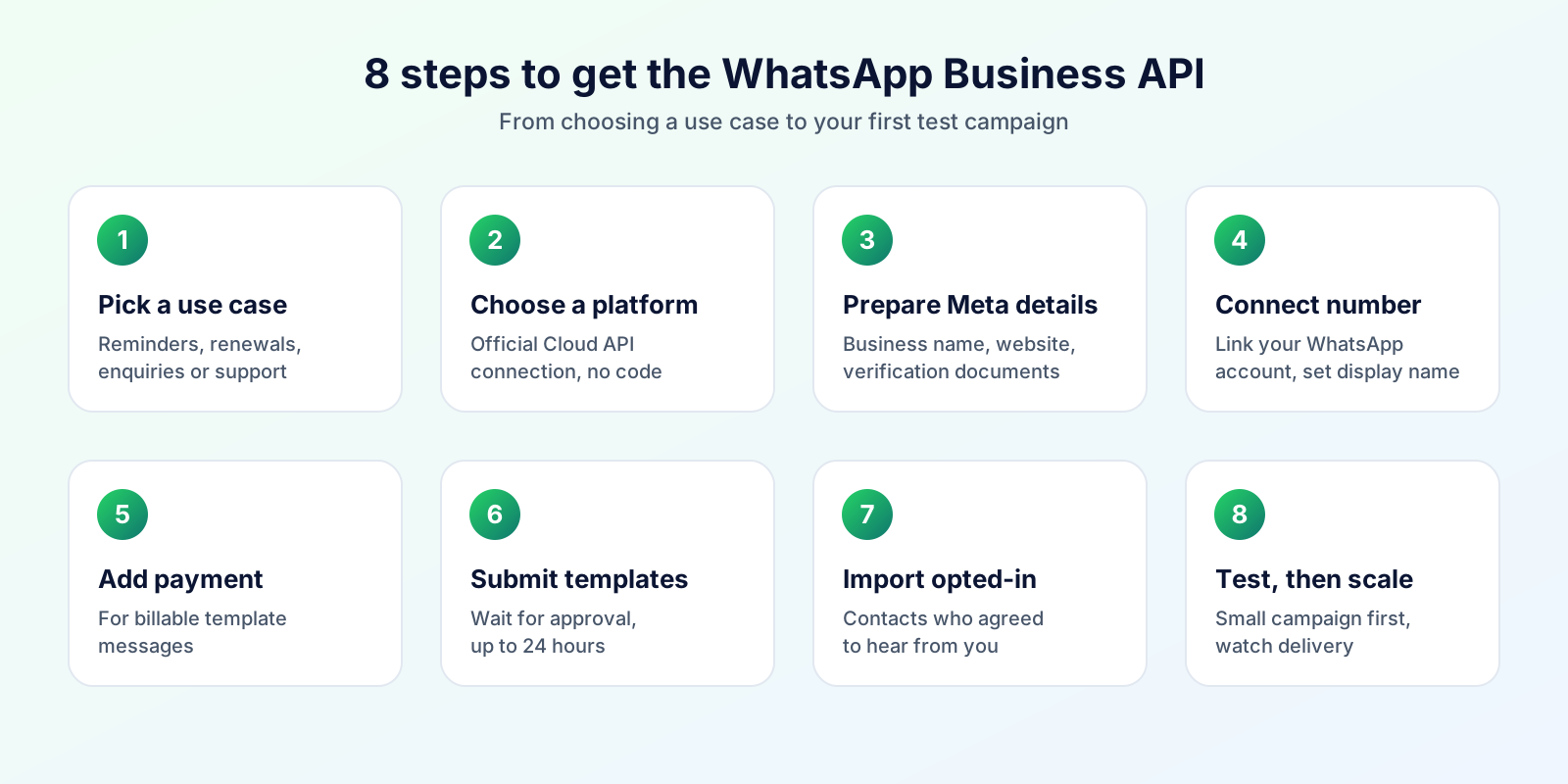
- Decide your use case. Reminders, enquiries, renewals, admissions or support.
- Choose a platform that connects through Meta's official Cloud API. Our checklist in the WhatsApp automation guide helps.
- Prepare your Meta business details: legal business name, website and documents for verification.
- Connect your WhatsApp Business Account and number, and set your display name.
- Create and submit templates, then wait for approval.
- Import contacts that opted in, and send a small test campaign first.
- Monitor delivery and replies, and adjust before scaling up.
How Bigool Connect Works With the WhatsApp Business API
Bigool Connect connects your WhatsApp Business Account through Meta's official WhatsApp Business Platform, so you do not need to write code against the API. In one workspace you can manage contacts, create and use templates, run campaigns (including sending again to contacts whose message failed, was delivered or was read), set up date-based and other automations, and handle customer conversations with your team. An optional AI assistant can answer routine questions and hand a chat to a person.
Features depend on your plan. See the pricing page for plans and charges.
Explore Bigool Connect and see how the WhatsApp Business API can fit your business without any coding. → Book a free demo
Frequently Asked Questions
What is the WhatsApp Business API? The WhatsApp Business API, officially the WhatsApp Business Platform, is Meta's interface that lets businesses connect WhatsApp to software so they can send template messages, run campaigns, share an inbox across a team and automate replies, at a scale the WhatsApp Business App is not designed for.
What does the WhatsApp Business API cost? For current plans and how WhatsApp usage is charged, see https://bigoolconnect.in/pricing
What is the difference between the WhatsApp Business App and the WhatsApp Business API? The Business App is an app for manual chatting and basic automation like greetings and quick replies. The API is used through software and supports team inboxes, approved templates, campaigns, automation and integrations, with Meta's policies and template approval.
How do I get access to the WhatsApp Business API? You need a Meta business portfolio, a WhatsApp Business Account, a business phone number and a display name, usually set up through a provider's software or Meta's tools. Business verification is optional to start but raises your sending limits.
Do I need Meta business verification? You can begin without it, with a low starting limit of 250 unique recipients per 24 hours for business-initiated messages. Completing business verification is one of the routes to the 2,000 tier and is required for features such as an official business account.
Can I use my existing WhatsApp number on the API? Often yes, but a number is normally used on either the consumer or Business App or the API, so migrating can mean moving your chats to the new setup. Meta also offers options for using both together, so check Meta's current documentation before switching.
Why were my WhatsApp templates rejected? Common reasons include choosing the wrong category, unclear or misleading wording, missing opt-in context, placeholder variables used incorrectly, or content that breaks the Business Messaging Policy. Fix the issue and resubmit, or appeal if you believe the decision was wrong.
What are WhatsApp messaging limits? Messaging limits cap how many unique customers you can message outside a customer service window in a rolling 24 hours. New accounts start at 250 and can grow to 2,000, 10,000, 100,000 and unlimited as you send high-quality messages and, where required, verify your business.
Can I use the WhatsApp Business API without coding? Yes. A WhatsApp automation platform handles the technical connection and gives you screens for contacts, templates, campaigns and inbox, so most businesses never write code against the API directly.
Is the WhatsApp Business API safe and official? Yes, it is Meta's official route for business messaging. Using it with a provider that connects through Meta, and following the Business Messaging Policy, is the safe approach, unlike unofficial tools that automate personal accounts and risk number bans.
Sources: Meta's WhatsApp Business Platform documentation (Cloud API overview, messaging limits, message templates), the WhatsApp Business Messaging Policy. Details change, so confirm against Meta's current pages. Bigool Connect is an independent product and is not endorsed by or affiliated with WhatsApp or Meta.
More Guides for Odisha Businesses
- Language: Odia WhatsApp message templates
- Choosing: WhatsApp Business App vs API
- Cities: Rourkela, Berhampur, Puri, Balasore and Bhadrak, Jharsuguda and Angul, Koraput, Jeypore and Baripada
- Industries: coaching institutes, clinics, food businesses, jewellers and handloom shops, hotels and homestays, real estate, gyms and salons
- Seasons: Rath Yatra, Durga Puja and Diwali, Odia festival greetings
- Getting started: WhatsApp for Odisha MSMEs