On this page ▾
- What Is a WhatsApp Chatbot?
- What Is a WhatsApp AI Chatbot?
- What Is a WhatsApp AI Agent?
- WhatsApp Automation vs Chatbot vs AI Chatbot vs AI Agent vs Human Support
- How Does a WhatsApp AI Agent Work?
- What Can a WhatsApp Chatbot Do?
- What Can a WhatsApp AI Agent Do That a Traditional Chatbot Cannot?
- What AI Agents Cannot Do, and Where They Fail
- Meta's Own AI Agent vs a Platform Like Bigool Connect
- WhatsApp's Rules: What You Must Know Before Using a Chatbot
- WhatsApp Chatbot and AI Agent Use Cases by Industry
- WhatsApp AI Chatbot for Small Businesses
- Using a WhatsApp Chatbot for Lead Generation
- Using a WhatsApp AI Agent for Customer Support
- Real Conversation Examples
- What Does a WhatsApp Chatbot Cost?
- How to Choose a WhatsApp AI Platform: a Buyer's Checklist
- How to Set Up a WhatsApp AI Chatbot for Your Business
- How Bigool Connect Can Help With WhatsApp Automation and AI Conversations
- Frequently Asked Questions
- More Guides for Odisha Businesses
Most customers who message a business on WhatsApp ask one of a handful of questions: Are you open? How much is it? Where are you? Do you have this? Answering them all day by hand is slow, and a customer who waits an hour often goes elsewhere. A WhatsApp chatbot answers the routine questions at once, and a newer kind, the WhatsApp AI agent, can also take small actions and pass the chat to your team at the right moment.
This guide explains all of it for business owners: what each of these is, how they differ, how an AI agent works behind the scenes, what it can and cannot do, what WhatsApp's rules say, and how to set one up responsibly. It also covers Meta's own AI agent, which launched in 2026 and changes the choices you have. It is part of our series on WhatsApp automation, the WhatsApp Business API and WhatsApp message templates.
Quick answer: a WhatsApp chatbot is software that replies to customers on WhatsApp automatically, either by following fixed rules or by using AI to understand free-text questions. An AI agent is an AI chatbot that can also decide what to do next and use connected tools, such as tagging a contact, saving a note or handing over to a human. Both work best as a first line of support with your team behind them.
What Is a WhatsApp Chatbot?
A WhatsApp chatbot is software that talks to customers on WhatsApp on a business's behalf, answering questions and guiding them through simple steps without a person typing each reply.
The simplest chatbots are rule-based. They work like a phone menu: the customer taps a button or types a keyword, and the bot sends the matching reply. "Reply 1 for fees, 2 for timings, 3 to speak to our team." Every path is designed in advance, so the bot is predictable, which is exactly why many businesses start here.
The weakness is also the same: if a customer writes something nobody planned for, such as "can my son join mid-year if he missed the entrance test?", a rule-based bot either gives the wrong menu or says it does not understand.
What Is a WhatsApp AI Chatbot?
A WhatsApp AI chatbot uses a language model to understand what a customer writes in their own words and to reply in natural language, usually using information the business has supplied.
Instead of matching keywords, it reads the whole message and works out what the customer wants. It can handle different phrasings, spelling mistakes, mixed languages and follow-up questions such as "and on Sundays?", because it keeps the earlier part of the conversation in view.
The important phrase is "using information the business has supplied". A good AI chatbot answers from your timings, prices, services and policies. If it does not have the answer, it should say so and offer a person. An AI chatbot that invents an answer is worse than no chatbot, so the quality of the information you give it matters more than the AI model itself.
What Is a WhatsApp AI Agent?
A WhatsApp AI agent is an AI chatbot with the ability to act: it decides what to do next and can use tools, for example saving a contact's details, adding a tag, leaving a note for your team or handing the conversation to a human.
The difference from an AI chatbot is not how well it talks, but what it is allowed to do. A chatbot answers. An agent answers and then, where you have allowed it, takes a step: it records that a parent is interested in the science stream, flags a complaint for urgent attention, or stops replying and notifies your team.
Two honest cautions:
- "Agent" is a marketing word. Vendors use it for everything from a slightly smarter chatbot to a system connected to billing, bookings and stock. Ask exactly which actions it can perform.
- An agent can only act where a tool exists. If no booking system is connected, it cannot book anything. At best it can collect the request and pass it on.
WhatsApp Automation vs Chatbot vs AI Chatbot vs AI Agent vs Human Support
These tools solve different problems, and most businesses end up using several together.
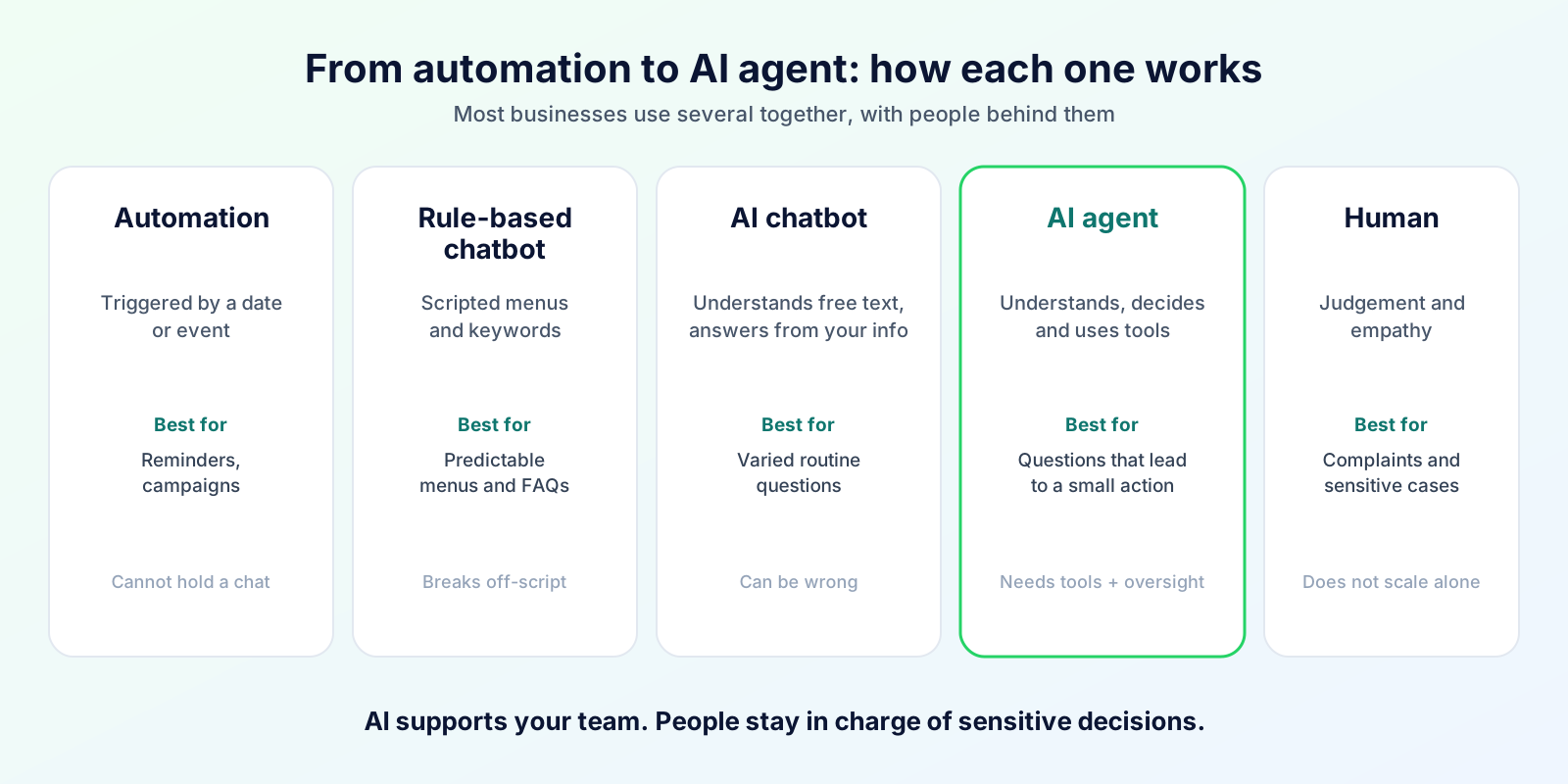
| Automation | Rule-based chatbot | AI chatbot | AI agent | Human | |
|---|---|---|---|---|---|
| Starts when | A date, event or status changes | Customer messages | Customer messages | Customer messages (or an event) | Customer or system escalates |
| How it works | If-this-then-that rules | Scripted menus and keywords | Language model plus your information | Language model plus tools, rules and guardrails | Judgement and experience |
| Understands free text | No | Limited | Yes | Yes | Yes |
| Remembers context | No | Within a flow | Within the chat | Within the chat, plus customer record if connected | Yes |
| Makes decisions | Fixed rules only | Follows the script | Chooses what to say | Chooses what to say and what to do | Yes |
| Takes actions | Sends scheduled or triggered messages | Moves through a flow | Rarely | Yes, through connected tools | Yes |
| Personalisation | Name, date, amount | Limited | Moderate | Higher, if customer data is available | Highest |
| Human handoff | Not applicable | Menu option | Should be built in | Should be built in, with context | The destination |
| Setup effort | Low | Medium (design every path) | Medium (quality of your information) | Higher (tools, rules, testing) | Hiring and training |
| Best for | Reminders, notices, campaigns | Predictable menus and FAQs | Varied routine questions | Questions that lead to a small action | Complaints, sensitive or complex cases |
When to use which
- Automation for things you know will happen: renewal reminders, appointment confirmations, birthday messages.
- Rule-based chatbot when the questions are few and predictable, and you want complete control of every reply.
- AI chatbot when customers ask the same things in many different ways.
- AI agent when the answer to a question should also trigger something, such as tagging a lead or alerting staff.
- Human for anything involving money disputes, complaints, health, safety or emotion.
How Does a WhatsApp AI Agent Work?
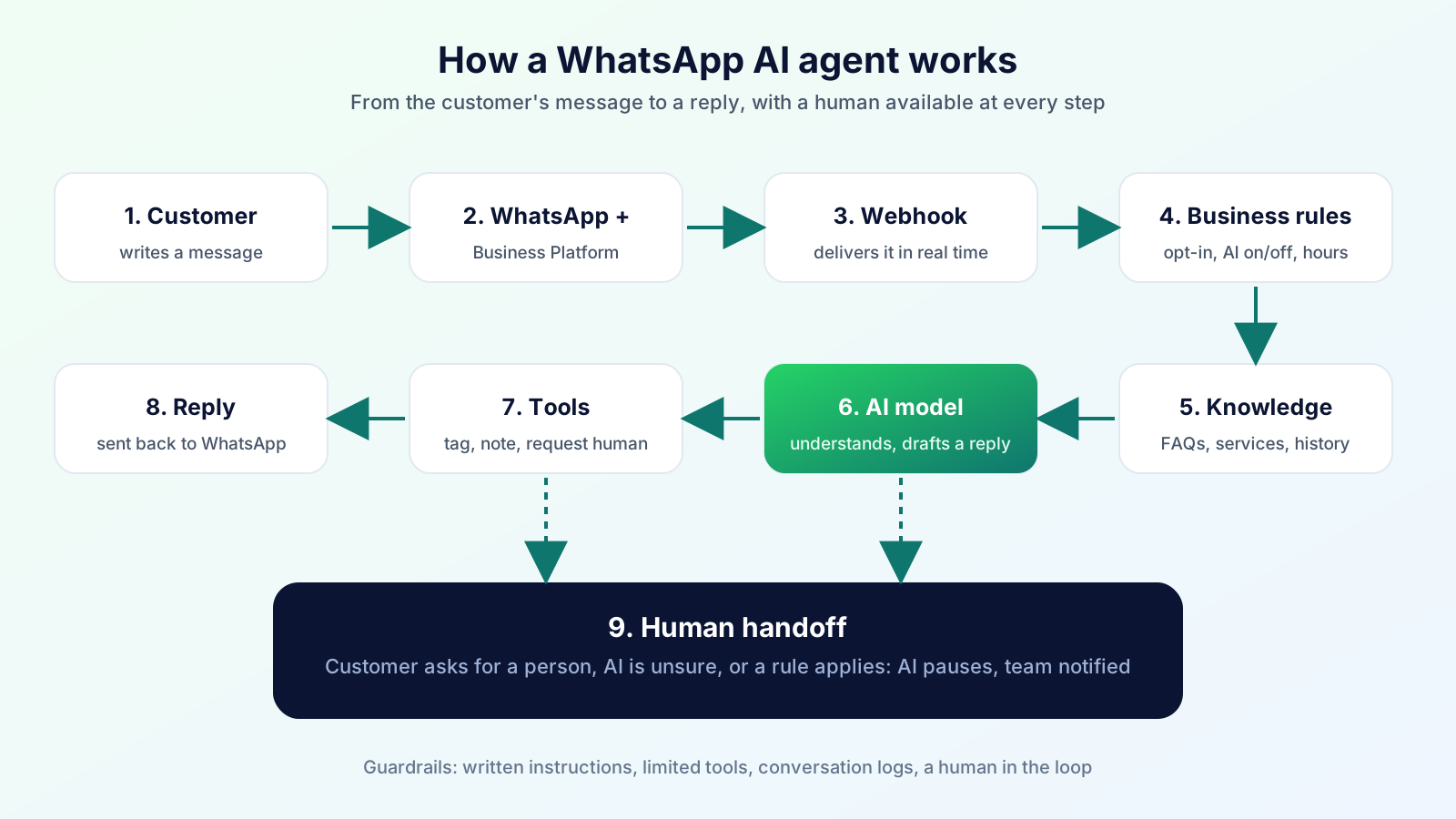
Behind a simple chat bubble there is a short chain of steps:
- The customer writes on WhatsApp.
- WhatsApp and the WhatsApp Business Platform receive the message. The Platform is Meta's official interface for businesses, normally used through a software provider.
- A webhook passes the message to your platform in real time, together with details such as the sender's number and the time.
- Business rules run first. Is this customer opted in? Is the AI switched on for this chat? Is a person already handling it? Is it outside business hours?
- Knowledge is gathered: your business description, FAQs, services and policies, plus the conversation so far.
- The AI model reads the message, the knowledge and the instructions you have given it, and decides what to say.
- The tool layer, if enabled, lets the AI take a limited action: add a tag, save a note, request a human.
- The reply goes back through the Platform to the customer's WhatsApp.
- Human handoff happens whenever the AI is unsure, the customer asks for a person, or a rule says a topic must go to staff. The AI pauses and your team is notified.
Four things make this safe rather than risky:
- Instructions: a written brief that says who the bot is, what it may discuss and what it must never do.
- Guardrails: hard limits that do not depend on the AI behaving, such as restricting which tools exist.
- Logs: a record of what was asked, answered and done, so you can review mistakes.
- A human in the loop: a person can read, take over and correct any conversation.
What Can a WhatsApp Chatbot Do?
The most useful way to think about it is to separate information (it tells the customer something) from actions (it does something). Information is easy and low-risk. Actions need a connected system and more care.
| Information the chatbot can give | Action it could take, if a system is connected |
|---|---|
| Business hours and holidays | Record a callback request |
| Address and directions | Create a lead with name and need |
| Products, services, menus, fees, courses | Tag the contact by interest |
| How to apply, join or book | Book an appointment (needs a booking system) |
| Policies such as returns or cancellations | Look up order status (needs access to your orders) |
| Membership or admission process | Create a support ticket (needs a ticketing system) |
| What documents to bring | Send a payment link (needs a payment integration) |
| Opening a feedback request | Hand over to a person and notify staff |
Do not assume a chatbot can book, pay, refund or look up records. Each of those needs an integration, and you should confirm exactly which ones your provider has before you promise customers anything.
What Can a WhatsApp AI Agent Do That a Traditional Chatbot Cannot?
- Understand natural language. "Is the 6 am batch still open?" and "any morning slots left" mean the same thing to an AI, but need two separate keyword rules in a menu bot.
- Hold a multi-turn conversation. It remembers what was said two messages ago, so the customer need not repeat themselves.
- Detect intent. It can tell a price enquiry from a complaint, and respond differently.
- Answer from your knowledge dynamically. It builds a reply from your FAQs and notes instead of pasting a pre-written block.
- Collect structured data conversationally. It can ask for a name, a course interest and a convenient time in a natural order, rather than a rigid form.
- Use tools. Where enabled, it can tag, note or escalate based on what it understood.
- Decide when to escalate. It can recognise frustration, a complaint or a question it cannot answer.
- Adapt tone and language. It can reply in the language the customer writes in, though quality varies by language and should be tested.
What AI Agents Cannot Do, and Where They Fail
Being honest about limits is what separates a useful bot from a liability.
- They can be wrong. Language models can produce a confident but incorrect answer, especially when your information is missing or out of date. No vendor can promise perfect accuracy.
- They only know what you tell them. Stale prices or old timings produce stale answers.
- They should not make high-risk decisions about refunds, medical advice, legal matters, safety or anything involving significant money.
- They should not collect sensitive data such as passwords, OTPs or card numbers.
- They struggle with emotion. An upset customer needs a person quickly.
- They cannot act without tools. No integration, no action.
- They need monitoring. Read real conversations regularly and fix gaps.
Meta's Own AI Agent vs a Platform Like Bigool Connect
This is new information that most guides on this topic do not cover yet. In June 2026 Meta announced that Meta Business Agent, its own AI assistant for businesses, was available globally. According to Meta, a business can train it on its past conversations, website or catalogue, set its tone and the audience it answers, and have it answer on WhatsApp, Messenger and Instagram, with handoff to a human. It is set up from the WhatsApp Business app. Availability and features are changing quickly, so check Meta's current pages.
That gives small businesses two broad routes:
| Meta Business Agent | AI inside a platform on the WhatsApp Business Platform | |
|---|---|---|
| Where you set it up | WhatsApp Business app | A provider's software connected through the Platform |
| Best for | Very small businesses already happy with the Business App | Businesses that need a team inbox, campaigns, automation and records |
| Team inbox, tags, notes | Limited to the app's features | Provided by the platform |
| Campaigns and template automation | Not the focus | Core part of the platform |
| Control over AI instructions and tools | Set by Meta's controls | Depends on the platform |
Neither route is "better" for everyone. If you have a few chats a day, Meta's own agent may be enough. If you need to run campaigns, track customers, work as a team and automate reminders and follow-ups, you will want a platform.
WhatsApp's Rules: What You Must Know Before Using a Chatbot
This section summarises Meta's documentation. It is not legal advice.
- Opt-in. You may message people only if they gave you their number and agreed to hear from you on WhatsApp. Say clearly who you are and what they are signing up for.
- Customer-started conversations. When a customer messages you, you can reply freely for 24 hours (the customer service window).
- Business-started conversations. To message first, or after the window closes, you must use a Meta-approved message template.
- Promotional messages. Marketing templates need opt-in and are the most likely to cause blocks and quality problems.
- Human escalation. Meta's Business Messaging Policy expects automated experiences to provide a clear, prompt way to reach a person.
- Quality. Customers can block or report businesses, and Meta can limit what a business may send as a result.
- AI-specific terms. Meta's WhatsApp Business Platform terms restrict AI providers from using the Platform when AI itself is the primary product, for example a general-purpose assistant. Using AI as part of a business's own customer service is a different matter and is allowed. Read the current terms, because they are updated.
- Data and privacy. You remain responsible for how customer data is collected, stored and used. Follow the privacy law that applies to you, tell customers how their data is used and avoid putting sensitive data into chats.
Official sources: WhatsApp Business Messaging Policy, Meta's terms for the WhatsApp Business Platform.
WhatsApp Chatbot and AI Agent Use Cases by Industry
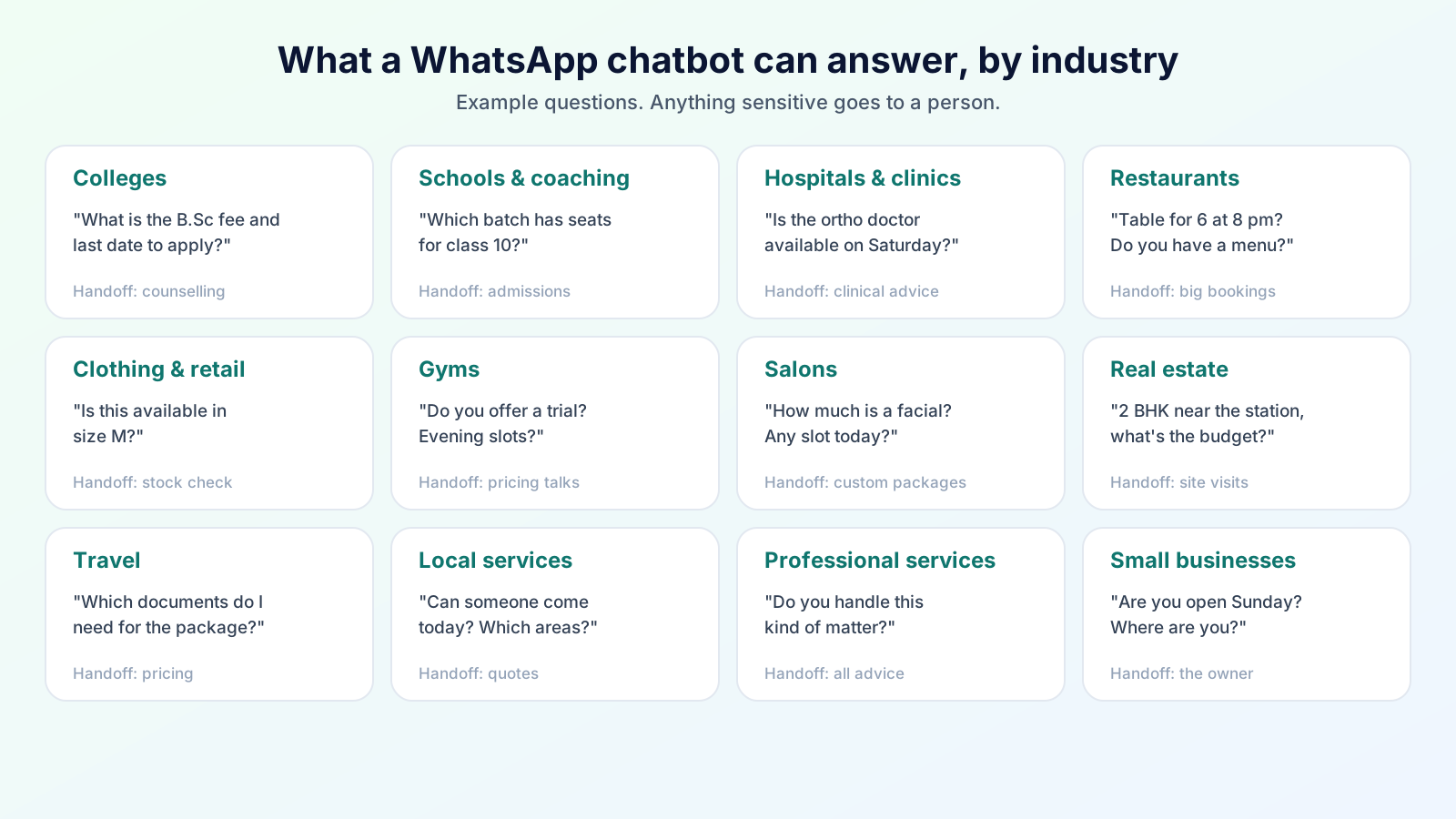
These are realistic patterns, not case studies. In every row, a person stays in charge of anything sensitive or unusual.
| Industry | Problem | Chatbot solution | AI agent opportunity | Human handoff |
|---|---|---|---|---|
| Education (general) | Parents ask the same questions all day | Fees, timings, documents, dates | Understand varied questions and note the child's grade and interest | Counselling, special cases |
| Colleges and universities | Admission season floods the phone | Course lists, eligibility, deadlines | Collect applicant details and course interest, tag by programme | Counsellor calls, scholarship queries |
| Schools | Parents ask about notices, fees, transport | Fee dates, holiday notices, contact details | Answer in natural language, collect admission enquiries | Disciplinary, welfare or fee disputes |
| Coaching institutes | Batch and fee questions, demo bookings | Batch timings, syllabus, demo-class info | Capture class, subject and preferred slot | Admissions counselling |
| Hospitals | Visiting hours, departments, appointment queries | Hours, department list, how to book | Collect appointment requests for staff | Any clinical question, emergencies |
| Clinics | Missed appointments, repeat questions | Timings, doctor availability, directions | Take booking requests, flag urgent wording | Medical advice, urgent symptoms |
| Restaurants | Menu, timing and booking questions | Menu, hours, location, offers | Take a reservation request with date and party size | Large bookings, complaints |
| Clothing and retail | "Is this available in my size?" | Store hours, categories, return policy | Capture the product and size wanted for staff to confirm | Stock confirmation, returns disputes |
| Gyms | Plan, trial and renewal questions | Plans, timings, trial info | Qualify goals and preferred time, flag renewal interest | Pricing negotiation, injuries |
| Salons and makeover studios | Service menu and slot questions | Services, price ranges, hours | Capture service and preferred time, flag bridal enquiries | Custom packages, bridal bookings |
| Real estate | Many unqualified enquiries | Project details, location, brochure | Ask budget, location and timeline, classify the lead | Site visits, negotiation |
| Travel businesses | Package and visa-document questions | Package outlines, inclusions, documents | Collect destination, dates and group size | Pricing, changes, cancellations |
| Local service businesses | Quotes and availability | Services, areas covered, hours | Take the job type and location, note urgency | Quotes, on-site assessment |
| Professional services | Basic "do you handle X?" questions | Services, fees guidance, how to start | Collect the matter type and contact details | All advice, anything confidential |
WhatsApp AI Chatbot for Small Businesses
Small businesses often benefit most, because the owner or a single staff member answers the same questions in between everything else.
- Repeated questions. Timings, prices, location, "do you have..." take up most of the day.
- Lead capture. A bot can ask a new enquiry's name and need while you are busy, so nobody is lost overnight.
- Follow-up. Combined with automation, a reminder or a "still interested?" message goes out without you remembering.
- Business information. One well-written set of answers is used every time.
- Appointment and service enquiries. The bot collects what you need to confirm; you confirm.
- Human escalation. You are notified when someone needs a real conversation.
A sensible start: write down your 15 most-asked questions with their true answers, switch the bot on for new enquiries only, read every conversation for the first two weeks, and add what is missing.
Using a WhatsApp Chatbot for Lead Generation
A chatbot does not create demand, but it stops you from losing the demand you already have.
Customer finds you (ad, QR code, website, Google profile)
        ↓
Starts a WhatsApp conversation
        ↓
Bot answers first questions and asks 2–3 qualifying questions
        ↓
Details are saved to the contact record, with a tag
        ↓
Lead is classified (hot, warm, just browsing)
        ↓
Your sales team is alerted for hot leads
        ↓
Follow-up message is scheduled for the rest
Useful qualifying questions are short and natural: what they need, when they need it, a rough budget, and the best time to call. Avoid long forms. Customers will answer two or three questions in a chat but not ten.
Opt-in matters here too. A customer who messages you first has started a conversation, but sending them later promotional broadcasts still needs their permission.
Using a WhatsApp AI Agent for Customer Support
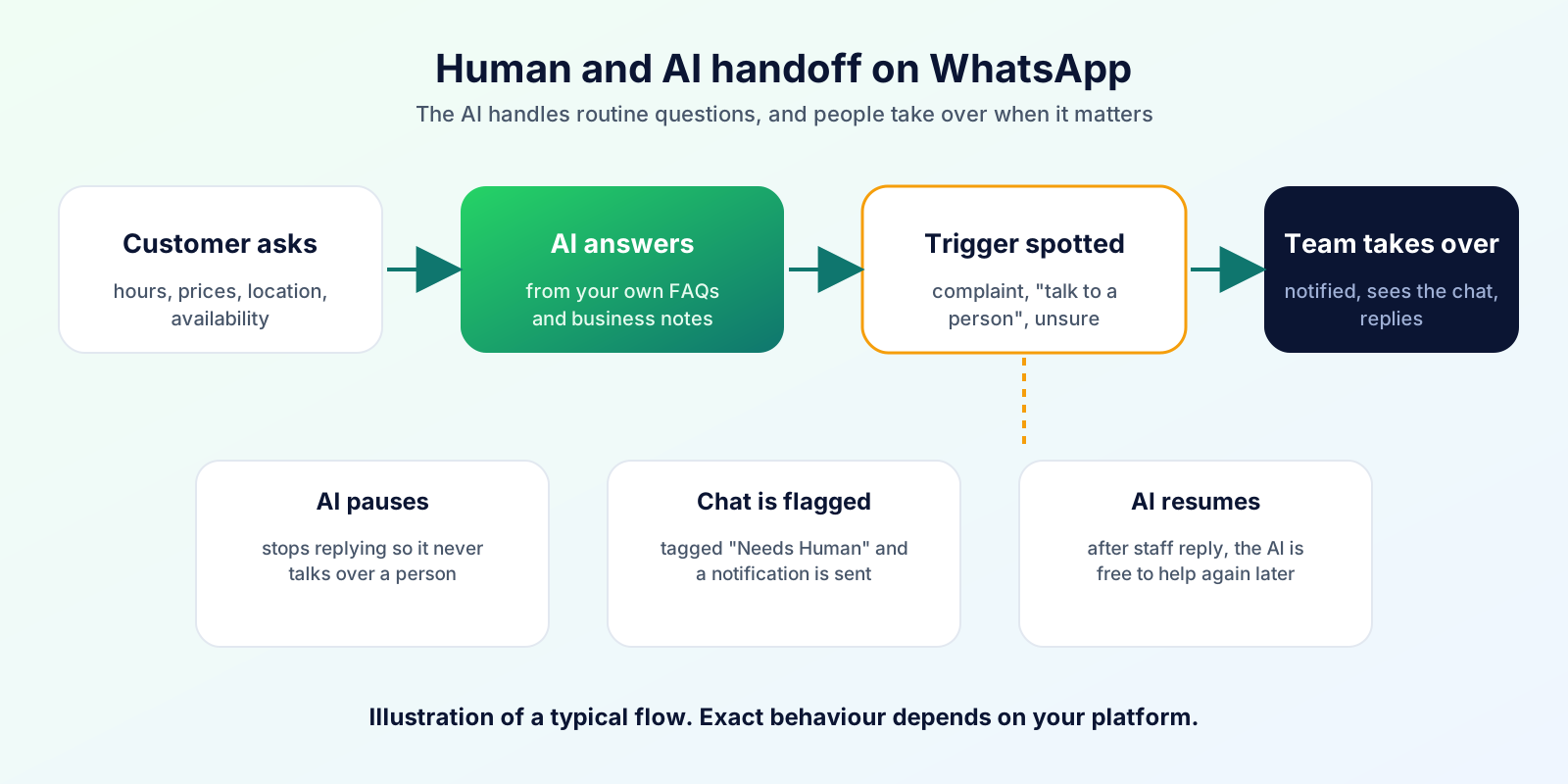
Customer support is where an AI agent is most useful, as long as it stays in the right lane.
- FAQs and first-level answers. Delivery areas, return policy, class timings.
- Status questions. "Is my order ready?" needs a connected system. Without one, the agent should say it will check and pass the chat to staff.
- Knowledge base. The agent is only as good as the answers it is given. Keep them current.
- Ticket creation. Possible only with a helpdesk or similar integration.
- Escalation. Complaints, repeated confusion, anger or a direct request for a person should move to a human immediately. Flag the chat, pause the AI and notify the team.
Do not trust AI blindly for sensitive or high-risk decisions. Refunds, medical or legal advice, safety issues, account security and anything involving large sums should always be decided by a person. A reasonable rule: the AI can gather and summarise; a human decides.
Real Conversation Examples
These are illustrative, not real customer chats. Notice that the AI answers from known information, asks only what it needs and hands over when it should.
1. Restaurant
Customer: Do you have a table for 6 on Saturday evening? AI agent: Happy to help! I can pass a booking request to our team. What time would you like, and what name should I note? Customer: 8 pm, under Rahul. AI agent: Thanks, Rahul. I've noted a table for 6 on Saturday at 8 pm. Our team will confirm shortly. For groups this size we may ask for a small advance, which they'll explain.
2. College
Customer: I scored 72% in 12th science. Can I apply for B.Sc? AI agent: Our B.Sc admission page lists eligibility by programme. Which subject are you interested in? I can share the details and the application dates. Customer: Physics. AI agent: Thanks. I've noted your interest in B.Sc Physics and shared the application steps. A counsellor will contact you for anything specific about eligibility or scholarships.
3. Clothing store
Customer: Is the blue kurta from your Instagram post available in M? AI agent: Thanks for asking! I can't check live stock myself, so I've asked our team to confirm the blue kurta in size M. They'll reply here shortly. Meanwhile, our store is open 10 am to 9 pm. Customer: Okay, please tell me the price too. AI agent: Our team will share the price with the stock confirmation.
4. Gym
Customer: Do you have a trial? AI agent: Yes, we offer a trial session. Do you prefer mornings or evenings, and what is your main goal: weight loss, strength or general fitness? Customer: Evening, weight loss. AI agent: Got it. I've noted that and asked a trainer to confirm an evening trial slot with you.
5. Service business
Customer: My AC is leaking water inside the room. AI agent: Sorry about that. To help our technician prepare, which area are you in, and is it leaking heavily right now? Customer: Sector 5, yes quite a lot. AI agent: Thanks. I've flagged this as urgent for our team, and a person will contact you shortly. If water is near electrical sockets, please switch off the power for safety.
What Does a WhatsApp Chatbot Cost?
For current plans and how WhatsApp usage is charged, see our pricing page.
How to Choose a WhatsApp AI Platform: a Buyer's Checklist
- Official WhatsApp integration. Does it use Meta's WhatsApp Business Platform, not an unofficial method that risks your number?
- Automation. Can it send reminders and follow-ups on dates and events?
- Templates. Can you create, submit and track templates?
- Inbox. Can your whole team see and answer conversations?
- Contact management. Tags, notes and history for each customer?
- Campaigns. Targeted sends, delivery tracking, exclusions?
- AI capability. Does it answer from your information, and can you control the instructions?
- AI agent and tool support. Exactly which actions can it take today?
- Human handoff. Does it pause the AI, notify staff and show context?
- Analytics. Can you see what was sent, delivered and answered?
- Security. Who can access chats, and how are team permissions handled?
- Privacy. Where is data stored, and how is it used?
- Scalability. Will it handle ten times your volume?
- Integrations. Does it connect to what you use, or only claim to?
- Plan clarity. Is it clear what each plan includes? Ours are on the pricing page.
- Support. Can you reach a person when something breaks?
- Compliance. Does it support opt-in records and respect Meta's policy?
How to Set Up a WhatsApp AI Chatbot for Your Business
- Define the use case. Pick one: answering FAQs, capturing leads or reducing missed enquiries.
- Set up WhatsApp infrastructure. A Meta business portfolio, WhatsApp Business Account, business number and display name, normally through your platform. Read our Business API guide.
- Configure messaging. Create your welcome message and the templates you need to start conversations.
- Create the knowledge base. Write down hours, address, services, prices, policies and the 15 to 30 questions customers ask most, with correct answers.
- Define the AI's instructions. Who it is, what it may discuss, its tone, what it must never do (no medical, legal or refund decisions) and when to hand over.
- Configure automation. Add reminders and follow-ups for the moments that repeat.
- Configure human handoff. Decide who is notified, how the chat is flagged and when the AI resumes.
- Test conversations. Ask the awkward questions yourself: misspellings, anger, out-of-scope requests, "talk to a person".
- Monitor. Read real conversations daily at first, then weekly.
- Improve. Add missing answers, correct wrong ones, tighten instructions, and expand only when quality is steady.
How Bigool Connect Can Help With WhatsApp Automation and AI Conversations
Bigool Connect, built by Bigool Digital, is a WhatsApp business communication platform that connects through Meta's WhatsApp Business Platform. Based on what the product does today, it helps with:
- Contacts and records: manage contacts with tags and notes.
- Campaigns: send template campaigns to selected audiences, exclude specific contacts, and send again to contacts whose message failed, was delivered or was read.
- Automations: date-based and scheduled messages such as birthdays and reminders.
- Templates: work with WhatsApp message templates.
- Shared inbox: manage customer conversations with your team, with notifications for new messages.
- AI-assisted replies: the AI answers from information you provide, including a business description, essential details, free-form notes and FAQs, and uses the earlier conversation for context.
- Safe actions and handoff: where enabled for your business, the AI can add a tag, leave an internal note, or hand the chat to a person. A handoff pauses the AI, tags the contact "Needs Human" and notifies your team. When a team member replies, the AI resumes and the tag clears. You can also switch the AI off for any individual chat.
- Multiple businesses: manage more than one business from one account where your plan allows.
Bigool Connect does not claim to replace your team, does not guarantee AI accuracy, delivery or sales. Features depend on your plan and setup. See the pricing page for plans and charges.
Explore Bigool Connect and see how WhatsApp automation and AI-assisted conversations can fit your business communication workflow. → Book a free demo
Frequently Asked Questions
What is a WhatsApp chatbot? A WhatsApp chatbot is software that replies to customers on WhatsApp automatically. It can follow fixed rules and menus, or use AI to understand free-text questions. Most business chatbots run through the WhatsApp Business Platform and hand the chat to a person when needed.
What is a WhatsApp AI chatbot? A WhatsApp AI chatbot uses a language model to understand what a customer writes in their own words and reply in natural language, usually drawing on information the business has provided, such as FAQs, services, prices and timings.
What is a WhatsApp AI agent? A WhatsApp AI agent is an AI chatbot that can also take limited actions, for example tagging a contact, saving a note, collecting details or handing the chat to a human. What it can do depends on the tools and integrations the business has connected.
What is the difference between a chatbot and an AI agent? A rule-based chatbot follows a script. An AI chatbot understands free text and answers from your information. An AI agent goes further by deciding what to do next and using connected tools to act, with guardrails and a path to a human.
How much does a WhatsApp chatbot cost? For current plans and how WhatsApp usage is charged, see https://bigoolconnect.in/pricing
Can I use AI on WhatsApp for my business? Yes. You can use AI for customer service and sales on the WhatsApp Business Platform through a provider, or use Meta's own Meta Business Agent in the WhatsApp Business app where it is available. Meta's terms restrict general-purpose AI assistants being the main product on the platform, but business customer-service use is allowed.
Can a WhatsApp chatbot answer customer questions? Yes, within the information it has been given. A good chatbot answers common questions about timings, prices, services and locations, and should say so honestly and hand over to a person when it does not know the answer.
Can a WhatsApp chatbot transfer a conversation to a human? Yes, and it should. Meta's policy expects automated experiences to offer a clear path to a person. Good setups pause the bot, flag the chat for your team and notify them.
Can a WhatsApp AI agent generate leads? It can help with lead capture and qualification by asking a few questions, saving the answers and passing warm leads to your team quickly. It does not create demand by itself, and results depend on your offer and follow-up.
Can small businesses use WhatsApp AI? Yes. Small businesses often benefit most because the same questions repeat all day. They can start with business hours, prices and location answers plus a human handoff, then expand.
Is WhatsApp automation allowed? Yes, when you follow WhatsApp's Business Messaging Policy: get opt-in before messaging people, use approved templates for business-initiated messages, avoid prohibited content and give customers a clear way to reach a person. Unofficial tools that automate personal accounts can lead to bans.
What is the WhatsApp Business API? The WhatsApp Business API, officially the WhatsApp Business Platform, is Meta's interface for connecting WhatsApp to software, so businesses can run shared inboxes, campaigns, chatbots and AI at scale. You normally use it through a provider rather than coding it yourself.
What is the difference between the WhatsApp Business App and the API? The Business App is a phone app for manual chatting with basic automation. The API is used through software and supports team inboxes, approved templates, campaigns, chatbots and integrations, with rules for business-initiated messages.
What is Meta Business Agent? Meta Business Agent is Meta's own AI assistant for businesses, announced as globally available in June 2026. Businesses can train it on their information and let it answer customers on WhatsApp, Messenger and Instagram, with handoff to a human. Availability is changing, so check Meta's current pages.
Is WhatsApp AI secure? Security depends on the platform you use. Ask where data is stored, who can access conversations, how long data is kept, and whether you can control what the AI is told. Never let an AI collect passwords, card numbers or other highly sensitive data, and keep a human in charge of high-risk decisions.
Will an AI chatbot replace my customer support team? No. It works best on routine, repeated questions and first replies, while people handle complaints, exceptions, negotiation and sensitive cases. Treat it as a first line that supports your team.
Talk to Bigool Digital about your WhatsApp automation workflow → bigoolconnect.in
Sources: WhatsApp Business Messaging Policy, Meta Terms for the WhatsApp Business Platform, Meta Business Agent and TechCrunch's report on its global launch. Rules, products and prices change, so confirm against Meta's current pages. The conversation examples are illustrative. Bigool Connect is an independent product and is not endorsed by or affiliated with WhatsApp or Meta.
More Guides for Odisha Businesses
- Language: Odia WhatsApp message templates
- Choosing: WhatsApp Business App vs API
- Cities: Rourkela, Berhampur, Puri, Balasore and Bhadrak, Jharsuguda and Angul, Koraput, Jeypore and Baripada
- Industries: coaching institutes, clinics, food businesses, jewellers and handloom shops, hotels and homestays, real estate, gyms and salons
- Seasons: Rath Yatra, Durga Puja and Diwali, Odia festival greetings
- Getting started: WhatsApp for Odisha MSMEs