On this page ▾
- What WhatsApp Automation and an AI Chatbot Do
- Why This Matters for Bhubaneswar Businesses
- Workflows by Industry
- A Lead Follow-Up Workflow You Can Copy
- How a WhatsApp AI Chatbot Works
- WhatsApp Business App vs Business Platform (API)
- What to Look for in WhatsApp Automation Software
- How to Choose a Provider: a Buyer's Checklist
- What Does WhatsApp Automation Cost?
- WhatsApp Messaging Rules in Brief
- A Sample 30-Day Implementation Plan
- How Bigool Connect Can Help
- Frequently Asked Questions
- Conclusion
- More Guides for Odisha Businesses
Anyone who runs a business in Bhubaneswar knows the pattern. Enquiries arrive on WhatsApp at all hours. The same ten questions come up every day: timings, fees, prices, location, "is admission open?". Follow-ups slip when the team is busy, and a customer who waits too long often moves on.
WhatsApp automation and AI chatbots can take the repetitive part of that work, while your people handle the conversations that need judgement. This page is a practical guide for businesses in and around Bhubaneswar: what these tools do, which workflows suit which type of business, what to check before you buy, and what it really costs.
If you want the full definitions first, read our guides to WhatsApp automation, the WhatsApp Business API and WhatsApp chatbots and AI agents. This page focuses on the local, practical side.
What WhatsApp Automation and an AI Chatbot Do
In one line each:
- WhatsApp automation sends messages for you when something happens: a new enquiry, an upcoming appointment, a birthday, a lapsed customer.
- A WhatsApp chatbot replies to incoming messages, either by following a fixed menu or, if it is AI-powered, by understanding a question written in the customer's own words.
- An AI agent is an AI chatbot that can also take small actions, such as tagging a contact or passing the chat to a person.
| Automation | Rule-based chatbot | AI chatbot / agent | |
|---|---|---|---|
| How it works | Fires a message on a trigger | Follows a fixed menu or script | Reads free text and answers from your information |
| Good for | Reminders, follow-ups, campaigns | Simple menus ("press 1 for fees") | Varied questions, enquiries, lead capture |
| Limitation | Cannot hold a conversation | Breaks on unexpected questions | Can be wrong, needs good information and guardrails |
| Needs | Approved templates, opt-in | Flow design | Business information, instructions, human handoff |
Most real setups combine all three, with a person behind them.
Why This Matters for Bhubaneswar Businesses
Bhubaneswar is a city of colleges, hospitals, clinics, shops, restaurants, startups and service firms, and many of them already handle customers on WhatsApp by hand. Odisha's Economic Survey for 2025-26 reports that services account for about 39.1% of the state's gross value added, according to coverage of the survey. The state's own tables are published by the Directorate of Economics and Statistics, Odisha. The state budget for 2025-26 also earmarked funds to develop land in Bhubaneswar for services, IT and R&D, as summarised by PRS India.
We do not claim this means a particular number of Bhubaneswar businesses use WhatsApp automation. What it does suggest is that service businesses, which depend on quick, personal replies, are a large part of the local economy. For them the practical gains are simple:
- Faster first replies to new enquiries, including at night and on holidays.
- Fewer repeated questions for your staff.
- Follow-ups that happen on time instead of when someone remembers.
- One shared inbox instead of several phones.
- A consistent answer on prices, timings and policies.
One local point deserves attention: customers write in English, Hindi, Hinglish and Odia, often in the same week. If this matters to you, test any chatbot with real messages in the languages your customers use before you commit. Bigool Connect's AI is instructed to reply in the language and script the customer writes in, but you should check the quality for your own sample messages.
Workflows by Industry
Each example below is illustrative, not a customer case study. Where staff must stay involved, we say so.
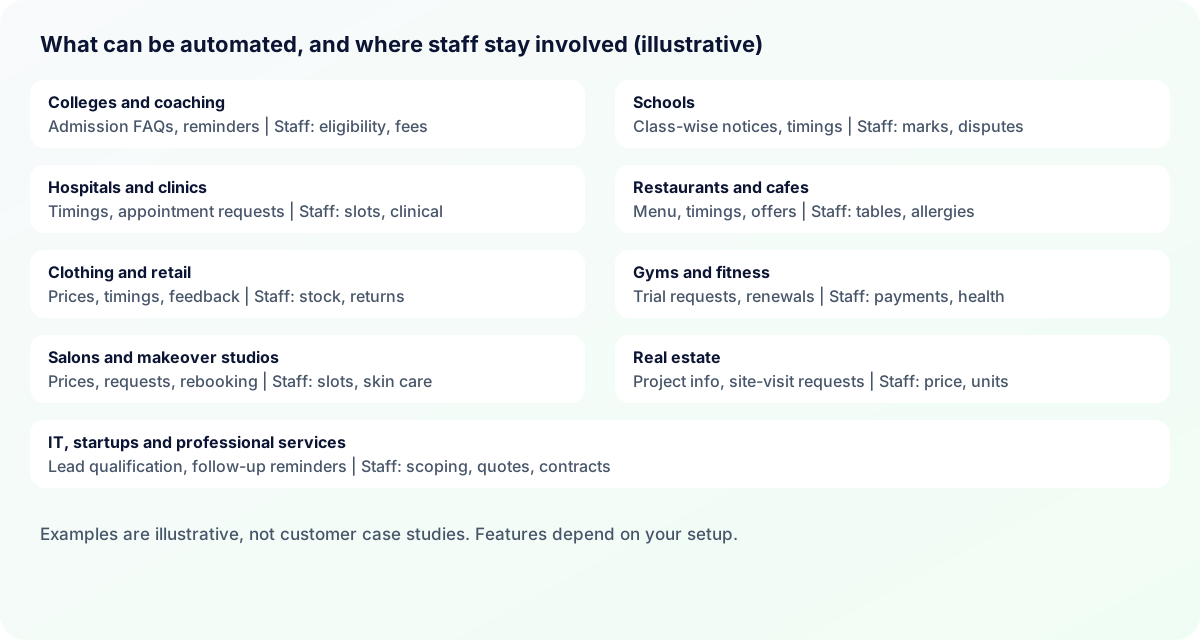
Colleges, universities and coaching institutes
- Problem: the same admission questions (courses, fees, last dates, documents) arrive in hundreds of chats during the admission season.
- Workflow: a prospective student messages the institute. The bot answers course and document questions from a prepared FAQ, asks for the student's name, course of interest and preferred call time, tags the enquiry and notifies the admissions team. Later, an approved template reminds the student about the application deadline.
- Needs: current fee and course information, a list of required documents, an opt-in for reminders.
- Staff stay for: eligibility decisions, fee negotiation, scholarship questions and anything involving official records.
- Benefit: every enquiry gets a quick first reply and none is lost in a personal phone.
Fee reminders and exam notices can be sent to guardians who agreed to receive them. The system cannot verify payments or eligibility by itself unless you connect it to your own records.
Schools
- Problem: parents ask about holidays, timings and meeting dates; notices scatter across groups.
- Workflow: class-wise notices sent as approved templates to opted-in parents, with a reply option for questions that goes to the office.
- Staff stay for: marks, discipline and fee disputes.
Hospitals and clinics
- Problem: calls about OPD timings, doctor availability and appointments block the front desk.
- Workflow: the bot shares timings and directions, takes an appointment request (patient name, department or doctor, preferred day) and passes it to reception to confirm. A reminder goes out before the visit and a follow-up reminder afterwards.
- Staff stay for: confirming slots, emergencies, billing questions and every clinical question.
- Important: do not let a chatbot give diagnosis or treatment advice. Treat patient data as sensitive and share only what is necessary.
Restaurants, cafes and hospitality
- Problem: repeated questions on menu, timings and table availability, plus no easy way to bring regulars back.
- Workflow: the bot answers menu and timing questions and notes table requests for staff to confirm. Opted-in guests receive weekend offers and birthday wishes.
- Needs: current menu and prices, opening hours.
- Staff stay for: table confirmation and allergy questions. An enquiry chatbot is not an order, payment or inventory system unless you integrate one.
Clothing and retail stores
- Problem: "Is this in stock? What is the price?" at all hours.
- Workflow: the bot answers prices, timings and exchange policy, and asks your team to confirm stock and sizes, because it cannot see live inventory unless connected to it. After a purchase, a thank-you and a feedback request go out.
- Staff stay for: stock checks, returns and complaints.
Gyms and fitness centres
- Problem: memberships lapse quietly and trial enquiries go cold.
- Workflow: the bot notes trial requests, and reminders go out before a membership ends, with a nudge for members who have stopped visiting.
- Staff stay for: payments, refunds and medical questions.
Salons and makeover studios
- Problem: price and slot questions interrupt services; clients forget to rebook.
- Workflow: the bot answers service prices, notes appointment requests (service, day, time) for the team to confirm, and sends a thank-you and a rebooking nudge.
- Staff stay for: confirming slots, since the bot cannot see the stylists' calendar, and skin-sensitivity questions.
Real estate and property services
- Problem: enquiries from hoardings and portals go unanswered for hours.
- Workflow: the bot answers project and price-range questions, notes the site-visit request and passes it to the sales team, then sends a thank-you and feedback request after the visit.
- Staff stay for: price negotiation, availability of a specific unit and legal questions.
IT, startups and professional services
- Problem: leads from a website or referral need a fast, qualified first response.
- Workflow: the bot asks what the prospect needs, saves the answers, tags the lead and notifies the right person; a follow-up reminder is scheduled for the team.
- Staff stay for: scoping, quotes and contracts.
A Lead Follow-Up Workflow You Can Copy
This simple five-step flow suits almost any local service business. It is an illustration, not a client result.
- A customer messages after seeing a hoarding, ad or referral.
- The AI or chatbot replies within seconds with timings, a short description and one question: "What would you like help with?"
- It records the name and need, and tags the contact, for example as a new enquiry.
- If the question is about price negotiation, a complaint or anything sensitive, the chat is handed to a person and flagged.
- If there is no reply after a day or two, an approved follow-up message goes out to the opted-in contact.
How a WhatsApp AI Chatbot Works
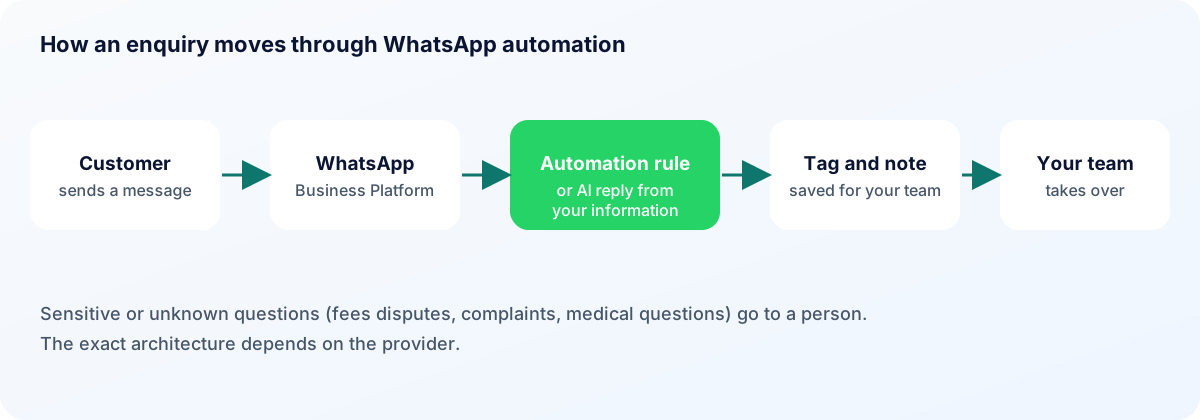
Customer sends a message, the WhatsApp Business Platform delivers it to your software, the software applies automation rules or sends the question to an AI model together with your business information, a reply is produced, and the chat is handed to a person when needed. The exact architecture depends on the provider. For a deeper explanation, see how a WhatsApp AI agent works.
WhatsApp Business App vs Business Platform (API)
| WhatsApp Business App | WhatsApp Business Platform (API) | |
|---|---|---|
| Intended use | Small business, one phone | Businesses that need automation and teams |
| Automation | Basic: greeting, away message, quick replies | Workflows, chatbots and AI through software |
| Team access | Limited number of devices | Several agents through a shared inbox |
| Templates | Not the main model | Approved templates to start conversations |
| Campaigns | Limited | Template campaigns to opted-in audiences |
| Integrations | Few | Connects to other software |
| Scaling | Manual | Built for volume |
Details vary over time, so confirm current limits in the official WhatsApp developer documentation. Our guide to the WhatsApp Business API explains it in plain language.
What to Look for in WhatsApp Automation Software
Treat these as evaluation criteria, not as a list of what every product has:
- Contact management with tags and notes.
- Template creation and approval support.
- Campaigns to selected audiences, with opt-in and opt-out handling.
- Workflow automation for reminders and follow-ups.
- A shared inbox with roles for staff.
- AI-assisted replies that use your information and can hand off to a person.
- Analytics on delivery, reads and replies.
- Integrations you actually need.
- Clear security and data-handling terms.
How to Choose a Provider: a Buyer's Checklist
Ask each provider these questions and write down the answers:
- Whose WhatsApp account is it? Your business should own its number and account.
- Is it the official platform? Ask how the provider connects to Meta and who is the Business Solution Provider. Meta lists approved providers; verify claims rather than relying on a sales page.
- Templates and consent: who writes and submits templates, and how are opt-ins and opt-outs recorded?
- Plans: what does each plan include, and where can you see the current plans?
- Human handoff: how does a chat reach a person, who is notified, and when does the bot resume?
- Integrations: what connects today, and what is a custom project?
- Language support: test Odia, Hindi and Hinglish with your own sample messages.
- Security and data: where is data stored, who can see it, and can you export it?
- Support and training: who helps your team in the first month, and in which language?
- Exit: if you leave, do you keep your number, contacts and chat history?
Be careful with offers that sound too good to be true. Ask what is included and what is not. We do not rank providers; run a small pilot with one or two and judge the results.
What Does WhatsApp Automation Cost?
For current plans and how WhatsApp usage is charged, see our pricing page.
WhatsApp Messaging Rules in Brief
WhatsApp's Business Messaging Policy was last updated on 23 September 2026. In short:
- Consent: message only people who have opted in to hear from you, and you are responsible for how you collect that consent.
- Opt-out: respect requests to stop, and make it clear how to opt out.
- Templates: to start a conversation you need an approved message template. Free-form replies are allowed within the 24-hour customer service window.
- Human help: automated experiences should give customers a clear way to reach a person.
- AI: Meta's business terms restrict AI providers whose main product is a general-purpose AI assistant. AI used for your own customer service is a different matter, but read the terms or ask your provider.
This is general information, not legal advice. Check the current policy before you launch.
A Sample 30-Day Implementation Plan
| Week | What happens |
|---|---|
| 1 | Pick one workflow (for example, enquiry replies). Collect your FAQs, prices, timings and documents. Connect your WhatsApp number. |
| 2 | Write and submit the first templates. Set the AI's instructions: what it may discuss, what it must never do, when to hand over. |
| 3 | Test with your own team using awkward questions, misspellings and Odia or Hinglish messages. Fix gaps. |
| 4 | Go live with one workflow. Read conversations every day. Add a second workflow only when the first is stable. |
How Bigool Connect Can Help
Bigool Connect, built by Bigool Digital, is a WhatsApp business communication platform that connects through Meta's WhatsApp Business Platform. Based on what the product does today, it offers:
- Contacts and tags with notes, groups and segments.
- Template campaigns to selected audiences, with delivery, read and reply tracking.
- Automations for birthdays, reminders and date-based messages.
- A shared inbox for your team, with notifications.
- AI-assisted replies drawn from information you provide, with handoff to your team, which pauses the AI and flags the chat.
- Business-specific workspaces for healthcare, education, restaurants and gyms, and WhatsApp QR codes that open a chat with a message already typed.
- Several businesses under one account, where your plan allows.
Bigool Connect does not replace your team, does not guarantee AI accuracy, message delivery or sales. Features depend on your plan and setup.
Explore Bigool Connect and see how it fits your workflow. Discuss WhatsApp automation for your business or see the pricing.
Frequently Asked Questions
What is WhatsApp automation? It is software that sends and manages WhatsApp messages automatically, based on triggers such as a new enquiry, a date or an incoming message, while people handle what needs judgement. For the full definition, see our WhatsApp automation guide.
Is there a WhatsApp AI chatbot for businesses in Bhubaneswar? Yes. Several providers, including software platforms that work with businesses anywhere in India, offer WhatsApp chatbots and AI-assisted replies. Most are sold remotely, so a local office matters less than the provider's platform, onboarding, support and data handling. Bigool Connect is one option; compare more than one.
How can a business automate WhatsApp messages? Small, manual automation (greeting and away messages, quick replies) is available in the WhatsApp Business App. For reminders, campaigns, a shared team inbox, workflows and AI replies, businesses connect to the WhatsApp Business Platform through a software provider.
What is the difference between the WhatsApp Business App and the API? The app is a manual tool for a small team on a phone. The Business Platform (API) is built for automation, several team members, approved templates and integrations.
Can a WhatsApp chatbot answer customer enquiries? Yes, within the information it has been given, such as timings, services, prices and location. It should hand the chat to a person when it does not know the answer or when the matter is sensitive, such as a complaint, a fee dispute or a medical question.
Can colleges and coaching institutes use WhatsApp automation? Yes, for admission enquiries, course information, document checklists, event notices and reminders sent to people who agreed to receive them. A chatbot cannot verify eligibility, payments or records unless it is integrated with your own systems, and office staff should handle those.
Can hospitals and clinics use WhatsApp automation? For administrative tasks such as timings, directions, appointment requests and reminders, yes. It should not give diagnoses or treatment advice, and patient data needs careful handling. Keep emergencies and clinical questions with your staff.
How much does WhatsApp automation cost? For current plans and how WhatsApp usage is charged, see https://bigoolconnect.in/pricing
Is WhatsApp automation allowed by Meta? Yes, on the WhatsApp Business Platform, if you follow the WhatsApp Business Messaging Policy: message only people who opted in, respect opt-outs, use approved templates to start conversations and offer a way to reach a person. Automating personal accounts with unofficial tools can lead to bans.
Can a WhatsApp AI chatbot transfer a chat to my staff? It should be able to. Meta's policy expects automated experiences to provide a clear path to a person. In a good setup the bot pauses, the chat is flagged and your team is notified.
How do I choose a WhatsApp automation provider in Bhubaneswar? Ask who owns your WhatsApp number and account, whether the provider uses the official platform, how templates and opt-ins are handled, what each plan includes, how human handoff works, and whether you can leave with your data. Run a small pilot before committing.
Does Bigool Connect offer AI-assisted conversations? Yes. The AI answers from information you provide, such as your business description, essential details, notes and FAQs. Where enabled, it can add a tag, leave an internal note or hand a chat to your team, which pauses the AI and notifies staff. It does not guarantee accuracy, so your team stays in charge.
Conclusion
The best WhatsApp automation is the one that fits how your business already talks to customers. Start with one repeated task, such as enquiry replies or reminders, keep a person in the loop for anything sensitive, and measure the result before you add more. If you would like to see how that could work for your workflow, talk to Bigool Connect.
More Guides for Odisha Businesses
- Language: Odia WhatsApp message templates
- Choosing: WhatsApp Business App vs API
- Cities: Rourkela, Berhampur, Puri, Balasore and Bhadrak, Jharsuguda and Angul, Koraput, Jeypore and Baripada
- Industries: coaching institutes, clinics, food businesses, jewellers and handloom shops, hotels and homestays, real estate, gyms and salons
- Seasons: Rath Yatra, Durga Puja and Diwali, Odia festival greetings
- Getting started: WhatsApp for Odisha MSMEs